Templates · List and feed screens · Sports app · Crag
Crag Logbook screen
A list screen from Crag, a climbing gym logbook app template in a Neubrutalism style. Screen 13 of 25.
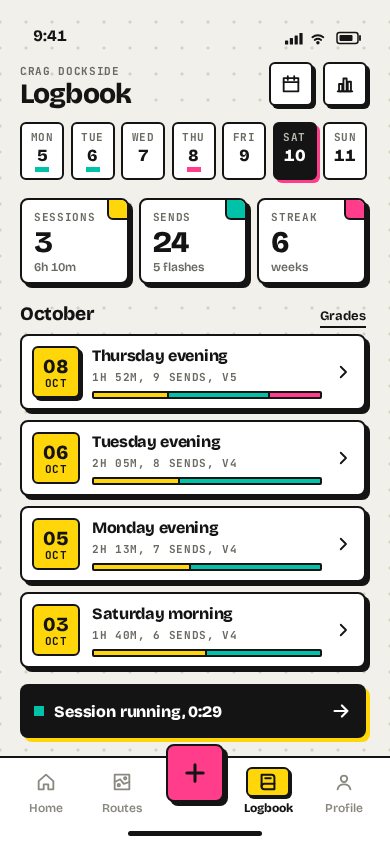
Crag is a complete climbing gym app: welcome, sign in and a code check, picking your level, a home with how busy the gym is and this week's climbing, the gym, a wall topo with every problem on it, route search, a route with its holds and beta, logging a send, a live session, the logbook, a session recap, the grades pyramid, progress, a training plan with a hangboard timer, the leaderboard, a climber, the membership pass, plans, notifications, profile and settings. Chalk white with pink, teal and yellow holds and black outlines.
| Detail | Value |
|---|---|
| Screen type | List |
| App | Crag: Climbing gym logbook |
| Category | Sports |
| Design language | Neubrutalism, light |
| Type | Bricolage Grotesque |
| Colours | #f1f0ea background, #ffffff surface, #141414 text, #6a6962 text-muted, #ff3d8b accent, #141414 accent-contrast, #00c2a8 secondary, #141414 border, #f0421c danger |
What this screen says
- Crag Dockside
- Logbook
- Mon 5
- Tue 6
- Wed 7
- Thu 8
- Fri 9
- Sat 10
- Sun 11
- Sessions 36h 10m
- Sends 245 flashes
- Streak 6weeks
- OctoberGrades
- 08Oct
- Thursday evening
- 1h 52m, 9 sends, V5
- 06Oct
- Tuesday evening
- 2h 05m, 8 sends, V4
- 05Oct
- Monday evening
- 2h 13m, 7 sends, V4
- 03Oct
- Saturday morning
- 1h 40m, 6 sends, V4
- Session running, 0:29
- Home
- Routes
- Profile
Around it in Crag
More list and feed screens
- Scoreboard Play by play: Scores and news for every sport
- Bib Calendar: Find and enter races
- Wicket Commentary: Live cricket scores
- Courtside My runs: Pickup basketball games
- Tack Regattas: Sailing wind and regatta tracker
- Frag Schedule: Esports tournaments and teams
- Canter Instructors: Riding stables and lessons
- Ollie Clips: Skate spots and clips
- Eddy Rapids: River levels for paddlers
- Whistle Fixtures: Grassroots league manager for coaches
- Oche Practice: Darts scorer and leagues
- Cairn Trail list: Trails, contours and summits on one map sheet
What makes a good list screen
- Show what people need to decide. Each row should carry just enough to choose: a title, one or two details and a status. Everything else belongs on the detail screen.
- Keep rows consistent. The same information in the same place on every row lets people scan down a column instead of reading each item.
- Group with headings. Dates, categories or status headings break long lists into chunks people can skip through.
- Make common actions quick. Swipe actions, a checkbox or a heart on the row save opening the item for small tasks.
The full list screen guide and every example
Remix Crag free: describe your own app and it is drawn in this design. Or get its files from $10: Figma, React Native, SwiftUI, Flutter and HTML.