Templates · Profile screens · Fitness app · Donor
Donor Profile screen
A profile screen from Donor, a health and fitness app template in a Clinical style. Screen 24 of 25.
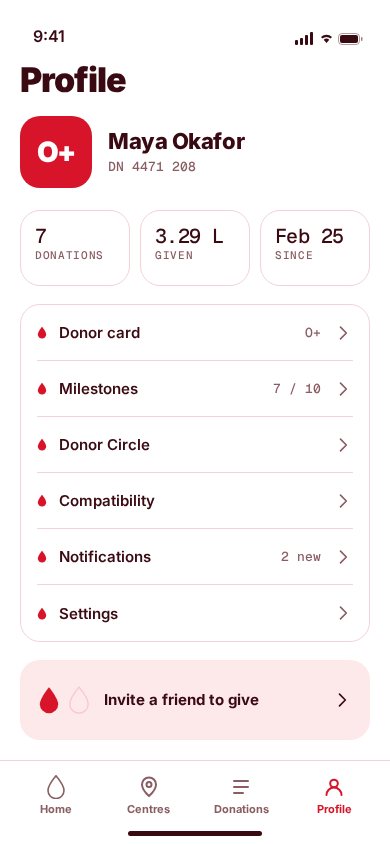
Donor is donor covers giving blood end to end: an eligibility checklist with big yes and no toggles, centres on a drawn map, slot booking and check in, a countdown ring to your next eligible date, recovery by blood component and a journey line from arm to hospital. It also has donation history, impact, stock levels, compatibility, milestones, a donor card, notifications, profile and settings.
| Detail | Value |
|---|---|
| Screen type | Profile |
| App | Donor: Blood donation, counted drop by drop |
| Category | Health and fitness |
| Design language | Clinical, light |
| Type | Inter |
| Colours | #ffffff background, #fde8ea surface, #3a0a12 text, #8a5d63 text-muted, #d7142a accent, #ffffff accent-contrast, #f3d3d7 border, #1f8a5b success |
What this screen says
- Profile
- O+
- Maya Okafor
- DN 4471 208
- donations
- 3.29 L
- given
- Feb 25
- since
- Donor card
- Milestones
- Donor Circle
- Compatibility
- Notifications
- 2 new
- Settings
- Invite a friend to give
- Home
- Centres
Around it in Donor
More profile screens
- Reformer Profile: Pilates studio booking
- Sip Profile: Water intake and hydration
- Mend Profile: Physio and rehab exercises
- Tabata Profile: HIIT interval timer
- Jab Coach: Boxing workouts with a smart bag
- Exhale Guide: Breathwork sessions
- Bump Profile: Pregnancy week by week
- Locker Coach: Gym membership and class booking
- Dew Profile: AI skin scan and routine
- Cradle Profile: Baby tracker
- Medly Profile: Doctor on call
- Unfold Profile: Yoga and stretching
Every fitness app profile screen
What makes a good profile screen
- Lead with identity. Photo, name and one line about the person at the top. It confirms whose profile this is.
- Show meaningful stats. Two to four numbers that matter in this app, like workouts, followers, books read or streak.
- Make editing obvious for the owner. An Edit profile button near the top, shown only on your own profile.
- Organise content with tabs. Posts, activity, saved or achievements as tabs keep a long profile tidy.
The full profile screen guide and every example
Remix Donor free: describe your own app and it is drawn in this design. Or get its files from $10: Figma, React Native, SwiftUI, Flutter and HTML.