Templates · Player, camera and editor screens · Smart home app · Couch
Couch Remote screen
A media screen from Couch, a smart home app template in a Dark-first style. Screen 16 of 25.
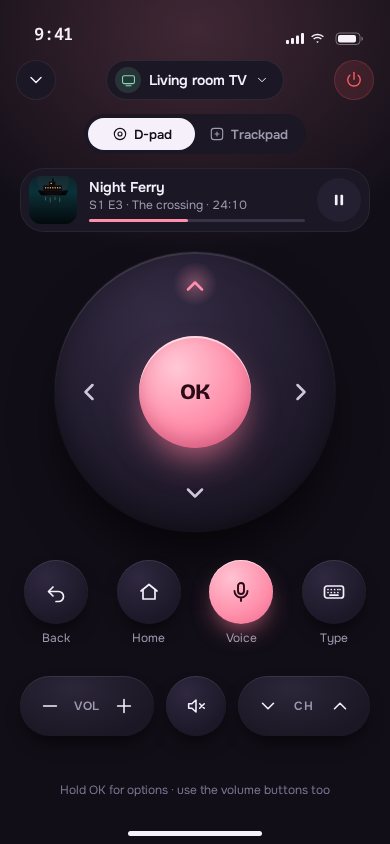
Couch is a complete TV companion: welcome, picking your services, sign in, a home with the TV you are connected to, continue watching and picks across services, a title page with where to watch, episodes, prices to stream, rent or buy, renting a film with a confirmation, search, browse by mood, one watchlist, a live channel guide and a live match, a device picker, a d-pad remote, a trackpad, typing on the TV, a casting screen, your watching week with cost per hour, family profiles, a profile, Couch Plus, notifications and settings. Deep aubergine with velvet rose and butter yellow.
| Detail | Value |
|---|---|
| Screen type | Media |
| App | Couch: TV remote, casting and watchlist |
| Category | Smart home |
| Design language | Dark-first, dark |
| Type | Bricolage Grotesque for headings, Onest for text |
| Colours | #110e17 background, #1b1724 surface, #f5f0fa text, #a198b0 text-muted, #ff8fab accent, #2a0b16 accent-contrast, #ffd27a secondary, #2b2538 border, #ff5a5f danger |
What this screen says
- Living room TV
- D-pad Trackpad
- Night FerryS1 E3 · The crossing · 24:10
- OK
- Back
- Home
- Voice
- Type
- VOL
- CH
- Hold OK for options · use the volume buttons too
Around it in Couch
More player, camera and editor screens
- Chime Listening: Voice assistant and smart speaker
- Mesh Placement: Home Wi-Fi network
- Decibel Now playing: Multi-room speakers
- Nursery Live: Baby monitor camera and sleep
- Porch Live view: Home security cameras
- Puddle Plant check: Garden watering and sprinklers
- Upkeep Guide: Home maintenance calendar
- Glow Music sync: Light scenes and colour
- Tagged Scan: Home inventory for insurance
- Sweep Camera: Robot vacuum and mop
- Dusk Camera: Smart home scenarios
- Lumen Speaker: Smart home energy
Every smart home app media screen
What makes a good media player screen
- Content takes the space. Artwork, video or the camera view should fill most of the screen.
- Primary controls in the thumb zone. Play and pause, the shutter or the main tool, large and low on the screen.
- Show progress and position. A scrubber with elapsed and remaining time, or the step in a lesson.
- Hide secondary controls until needed. Lyrics, queue, filters and advanced tools can live behind a tap or a swipe.
The full media player screen guide and every example
Remix Couch free: describe your own app and it is drawn in this design. Or get its files from $10: Figma, React Native, SwiftUI, Flutter and HTML.