Templates · List and feed screens · Smart home app · Couch
Couch Live screen
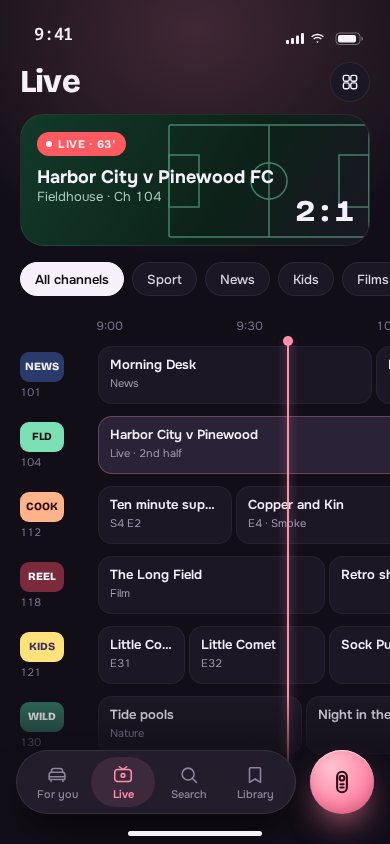
A list screen from Couch, a smart home app template in a Dark-first style. Screen 13 of 25.
Couch is a complete TV companion: welcome, picking your services, sign in, a home with the TV you are connected to, continue watching and picks across services, a title page with where to watch, episodes, prices to stream, rent or buy, renting a film with a confirmation, search, browse by mood, one watchlist, a live channel guide and a live match, a device picker, a d-pad remote, a trackpad, typing on the TV, a casting screen, your watching week with cost per hour, family profiles, a profile, Couch Plus, notifications and settings. Deep aubergine with velvet rose and butter yellow.
| Detail | Value |
|---|---|
| Screen type | List |
| App | Couch: TV remote, casting and watchlist |
| Category | Smart home |
| Design language | Dark-first, dark |
| Type | Bricolage Grotesque for headings, Onest for text |
| Colours | #110e17 background, #1b1724 surface, #f5f0fa text, #a198b0 text-muted, #ff8fab accent, #2a0b16 accent-contrast, #ffd27a secondary, #2b2538 border, #ff5a5f danger |
What this screen says
- Live
- LIVE · 63' Harbor City v Pinewood FCFieldhouse · Ch 104
- All channels Sport News Kids Films
- NEWS 101
- Morning DeskNews
- Market Hour
- FLD 104
- Harbor City v PinewoodLive · 2nd half
- Matchday recap
- COOK 112
- Ten minute supperS4 E2
- Copper and KinE4 · Smoke
- REEL 118
- The Long FieldFilm
- Retro shorts
- KIDS 121
- Little CometE31
- Little CometE32
- Sock Puppets
- WILD 130
- Tide poolsNature
- Night in the pines
- For you
- Search
- Library
Around it in Couch
More list and feed screens
- Meter Readings: Your energy supplier account
- Chime Devices: Voice assistant and smart speaker
- Latch Doors: Smart locks and guest access
- Mesh Devices: Home Wi-Fi network
- Decibel Queue: Multi-room speakers
- Nursery Lullabies: Baby monitor camera and sleep
- Porch Cameras: Home security cameras
- Sundial Roof: Solar panels and home battery
- Puddle Zones: Garden watering and sprinklers
- Upkeep Calendar: Home maintenance calendar
- Kelvin Rooms: Climate and thermostat
- Glow Rooms: Light scenes and colour
Every smart home app list screen
What makes a good list screen
- Show what people need to decide. Each row should carry just enough to choose: a title, one or two details and a status. Everything else belongs on the detail screen.
- Keep rows consistent. The same information in the same place on every row lets people scan down a column instead of reading each item.
- Group with headings. Dates, categories or status headings break long lists into chunks people can skip through.
- Make common actions quick. Swipe actions, a checkbox or a heart on the row save opening the item for small tasks.
The full list screen guide and every example
Remix Couch free: describe your own app and it is drawn in this design. Or get its files from $10: Figma, React Native, SwiftUI, Flutter and HTML.