Templates · Detail screens · Finance app · Wage
Wage Shift screen
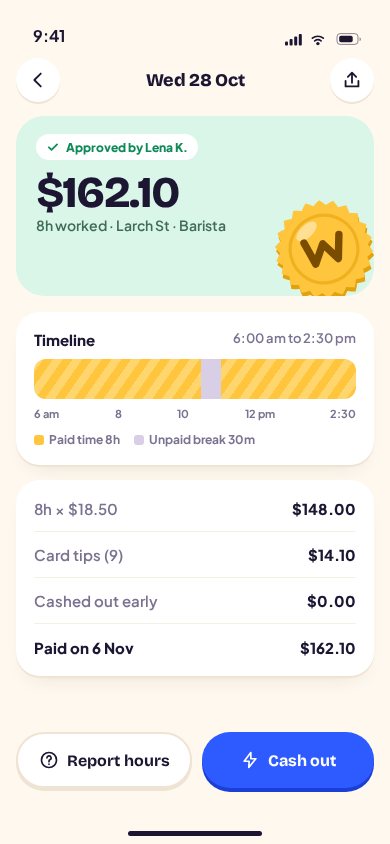
A detail screen from Wage, a finance app template in a Playful style. Screen 9 of 25.
Wage is a complete earned wage access app for shift workers: welcome, employer search, sign in and a text code, a home with pay earned so far on an odometer counter, QR clock in, a live shift dial that earns by the minute, the week of shifts, a shift breakdown, open shifts to pick up with bonus pay, cash out with a number pad, instant or free review and a coin burst success, earnings by day, a payslip, tips, savings pots and a new pot, activity, the Wage debit card, notifications, a Wage Plus plan, profile and settings. Cream and white with electric cobalt, coin gold, mint and bubblegum pink.
| Detail | Value |
|---|---|
| Screen type | Detail |
| App | Wage: Get paid as you work |
| Category | Finance |
| Design language | Playful, light |
| Type | Bricolage Grotesque for headings, Plus Jakarta Sans for text |
| Colours | #fff8ee background, #ffffff surface, #1c1633 text, #7a7290 text-muted, #2e5bff accent, #ffffff accent-contrast, #ffc53d secondary, #efe4d3 border, #f2483d danger |
What this screen says
- Wed 28 Oct
- Approved by Lena K.
- 8h worked · Larch St · Barista
- Timeline6:00 am to 2:30 pm
- 6 am 8 10 12 pm 2:30
- Paid time 8h Unpaid break 30m
- 8h × $18.50 $148.00
- Card tips (9) $14.10
- Cashed out early $0.00
- Paid on 6 Nov$162.10
- Report hours
- Cash out
Around it in Wage
More detail screens
- Rebate Card: Cashback card and rewards
- Aegis Auto policy: Insurance policies and claims
- Till Receipt: Card reader and sales for small shops
- Strike Stock: Options trading
- Prism Account: Net worth across every account
- Folio Stock: Stocks and ETF investing
- Compound Fund: Mutual funds and SIPs
- Halden Account: Premium neobank
- Billable Entry: Time tracking and invoices, kept like a ledger
- Lease Rent: Your tenancy, drawn to plan
- Claim Receipt: Expenses, filed like a till receipt
- Tally Groceries: Monthly budgeting
Every finance app detail screen
What makes a good detail screen
- Lead with what identifies the item. A large image or title, the price or status, and the key facts at the top. People should know they are in the right place at a glance.
- Keep the main action visible. A sticky bottom button for Add to cart, Book or Play stays reachable while people scroll through details.
- Order information by importance. The facts that decide the choice come first; reviews, specifications and fine print further down.
- Use progressive disclosure. Long descriptions, specifications and policies can expand on tap rather than filling the screen.
The full detail screen guide and every example
Remix Wage free: describe your own app and it is drawn in this design. Or get its files from $10: Figma, React Native, SwiftUI, Flutter and HTML.