Templates · List and feed screens · Fitness app · Careline
Careline Medications screen
A list screen from Careline, a care for an ageing parent app template in a Clinical style. Screen 8 of 25.
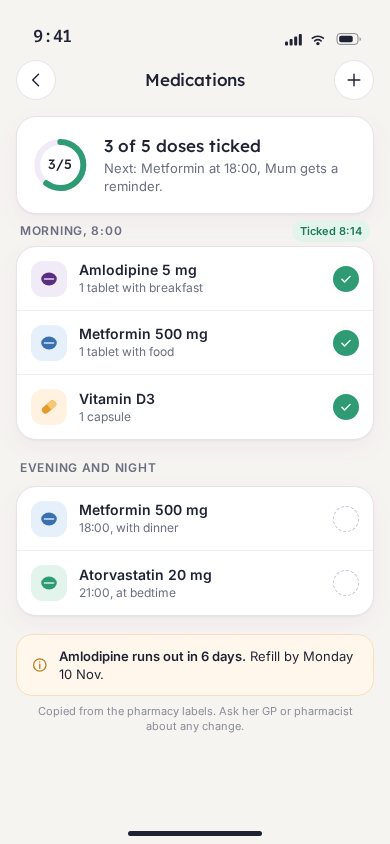
Careline is a complete family care circle app: welcome, sign in, a today screen with Mum's morning check in, a shared care calendar with open slots, task detail and sign up, new tasks, a medication schedule and refills, appointments with questions to ask, a live ride, an updates journal with comments, a big button check in for the parent, booking a paid home helper with a split cost, a document vault, the family chat, a monthly summary, a plus plan, notifications, the parent's profile with her circle, and settings. Porcelain and white with deep plum, a calm green for covered and a soft rose for help needed.
| Detail | Value |
|---|---|
| Screen type | List |
| App | Careline: Care for an ageing parent |
| Category | Health and fitness |
| Design language | Clinical, light |
| Type | Lexend for headings, Inter for text |
| Colours | #f6f4f1 background, #ffffff surface, #1e2233 text, #6b6f80 text-muted, #5a2d82 accent, #f1ebf8 primary-tint, #2e9b74 success, #d94f70 attention, #f2b25c warm-accent, #e7e2ea border |
What this screen says
- Medications
- 3 of 5 doses ticked
- Next: Metformin at 18:00, Mum gets a reminder.
- Morning, 8:00 Ticked 8:14
- Amlodipine 5 mg1 tablet with breakfast
- Metformin 500 mg1 tablet with food
- Vitamin D31 capsule
- Evening and night
- Metformin 500 mg18:00, with dinner
- Atorvastatin 20 mg21:00, at bedtime
- Amlodipine runs out in 6 days. Refill by Monday 10 Nov.
- Copied from the pharmacy labels. Ask her GP or pharmacist about any change.
Around it in Careline
More list and feed screens
- Locker Timetable: Gym membership and class booking
- Morsel Saved meals: AI calorie tracker
- Dew Routine: AI skin scan and routine
- Cradle Day: Baby tracker
- Medly Visits: Doctor on call
- Donor Donations: Blood donation, counted drop by drop
- Unfold Notifications: Yoga and stretching
- Kilo History: Strength training log
- Cyra Calendar: Cycle tracker
- Harbor Journal: Therapy and mood
- Fasten Plans: Intermittent fasting
- Plate Diary: Calorie and macro tracker
What makes a good list screen
- Show what people need to decide. Each row should carry just enough to choose: a title, one or two details and a status. Everything else belongs on the detail screen.
- Keep rows consistent. The same information in the same place on every row lets people scan down a column instead of reading each item.
- Group with headings. Dates, categories or status headings break long lists into chunks people can skip through.
- Make common actions quick. Swipe actions, a checkbox or a heart on the row save opening the item for small tasks.
The full list screen guide and every example
Remix Careline free: describe your own app and it is drawn in this design. Or get its files from $10: Figma, React Native, SwiftUI, Flutter and HTML.