Templates · Home screens · Social app · Candid
Candid Feed screen
A home screen from Candid, an one real photo a day app template in a Gen Z style. Screen 11 of 25.
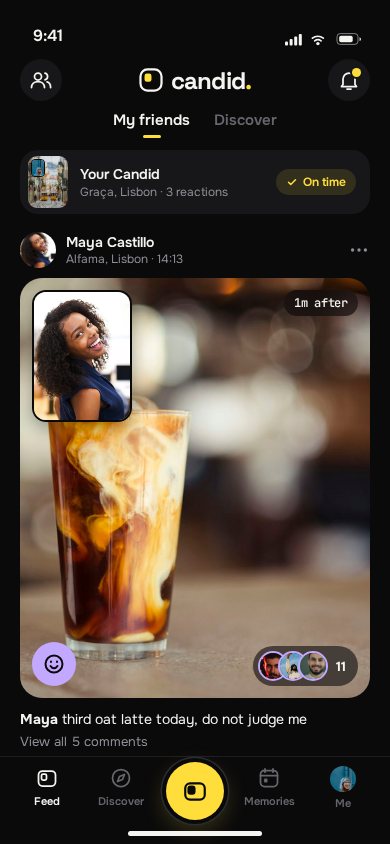
Candid is a complete daily photo app for close friends: welcome, how it works, phone sign in and code, finding friends, a locked feed, the two minute prompt, a dual camera with review and a posted screen, the unlocked friends feed, a post with comments, selfie reactions and a reaction camera, discovery, friends and requests, a friend's profile, a memories calendar, a single memory, a monthly recap, Candid Plus, notifications, your profile and settings. Near black with flash yellow and lilac.
| Detail | Value |
|---|---|
| Screen type | Home |
| App | Candid: One real photo a day |
| Category | Social |
| Design language | Gen Z, dark |
| Type | Space Grotesk for headings, Onest for text |
| Colours | #0a0a0b background, #17171a surface, #f4f4f0 text, #8d8d95 text-muted, #ffde3b accent, #0a0a0b accent-contrast, #c3a8ff secondary, #26262b border, #ff5a4e danger |
What this screen says
- candid.
- My friends Discover
- Your CandidGraça, Lisbon · 3 reactions
- On time
- Maya CastilloAlfama, Lisbon · 14:13
- 1m after
- Maya third oat latte today, do not judge meView all 5 comments
- Feed
- Discover
- Memories
- Me
Around it in Candid
More home screens
- Duo Home: An app for two
- Soapbox Floor: Weekly debates and polls
- Ballot Home: Settle it on paper
- Murmur Home: Chat rooms for art lovers
- Wink Home: Video first dating
- Snoot Home: Social app for pets
- Huddle Home: Interest groups and meetups
- Glade Home: Photo and clip social network
- Onair Home: Live streaming
- Drift Home: Reels and voice rooms
- Glitz Discover: Party live streaming
- Hearth Chats: Messenger for trips and circles
What makes a good home screen
- Put the most important thing first. Decide the one thing most people come for, like today's workout, a balance or the next booking, and give it the top of the screen.
- Make it feel current. Greetings with the time of day, today's date, fresh numbers and recent activity tell people the app is alive and about them.
- Keep quick actions within thumb reach. The two or three things people do most should be one tap away, in the lower part of the screen or a floating button.
- Group related content in clear sections. Use headings and spacing so the screen scans as a few blocks, not a long mixed list.
The full home screen guide and every example
Remix Candid free: describe your own app and it is drawn in this design. Or get its files from $10: Figma, React Native, SwiftUI, Flutter and HTML.