Templates · List and feed screens · Food app · Brigade
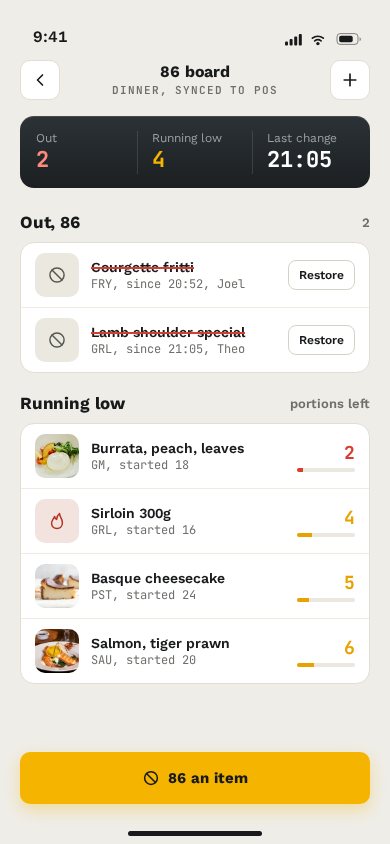
Brigade 86 board screen
A list screen from Brigade, a restaurant kitchen and line ops app template in an Enterprise style. Screen 12 of 25.
Brigade is a complete kitchen ops app for head chefs and their line: welcome, sign in and a station PIN, a live service home, the ticket rail with timers and an all day count, ticket and station details, the prep list with day dot labels, a recipe video with a portion scaler, new prep tasks, the 86 board, temperature checks and the food safety log, stock search, a supplier order with confirmation and live delivery, weekly reports, the crew on shift, notifications, a Pro plan, profile and settings. Warm stainless and white with brushed steel, saffron, and green to red timers.
| Detail | Value |
|---|---|
| Screen type | List |
| App | Brigade: Restaurant kitchen and line ops |
| Category | Food |
| Design language | Enterprise, light |
| Type | JetBrains Mono for headings, Work Sans for text |
| Colours | #efede7 background, #ffffff surface, #17191b text, #6d6f6a text-muted, #f4b400 accent, #17191b accent-contrast, #22272b secondary, #e1ded5 border, #d63d2e danger |
What this screen says
- 86 boardDinner, synced to POS
- Out 2
- Running low 4
- Last change 21:05
- Out, 86
- Courgette frittiFRY, since 20:52, Joel
- Restore
- Lamb shoulder specialGRL, since 21:05, Theo
- Running low
- portions left
- Burrata, peach, leavesGM, started 18
- Sirloin 300gGRL, started 16
- Basque cheesecakePST, started 24
- Salmon, tiger prawnSAU, started 20
- 86 an item
Around it in Brigade
More list and feed screens
- Curbside Reviews: Street food and food truck finder
- Forage In season: Farmers market and veg box
- Ember Cook log: Smoker and grill thermometer
- Steep Shelf: Tea brewing and tasting notes
- Nibs Swaps: Food allergy and label scanner
- Ladle Week plan: Recipes and meal planning
- Pantry Fruit and veg: Grocery delivery
- Brewly Menu: Coffee ordering and loyalty
- Tabla Reviews: Tables worth dressing for
- Corked Notifications: Wine journal and cellar
- Crumb Menu: Neighbourhood bakery
- Tiffin Restaurants: Food delivery
What makes a good list screen
- Show what people need to decide. Each row should carry just enough to choose: a title, one or two details and a status. Everything else belongs on the detail screen.
- Keep rows consistent. The same information in the same place on every row lets people scan down a column instead of reading each item.
- Group with headings. Dates, categories or status headings break long lists into chunks people can skip through.
- Make common actions quick. Swipe actions, a checkbox or a heart on the row save opening the item for small tasks.
The full list screen guide and every example
Remix Brigade free: describe your own app and it is drawn in this design. Or get its files from $10: Figma, React Native, SwiftUI, Flutter and HTML.