Templates · Dashboard and stats screens · Lifestyle app · Brief
Brief Reading stats screen
A dashboard screen from Brief, a news in sixty words app template in a Minimal style. Screen 22 of 25.
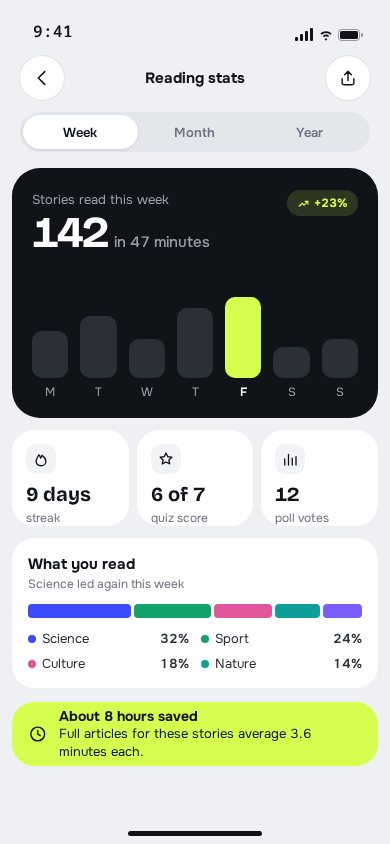
Brief is a complete short news app: welcome, topic picks, sign in and a code, a feed of full screen sixty word story cards stacked like a deck, the full story reader, a morning brief, discover with sections and trending topics, search, a section page, a trending topic timeline, a poll and its results, a weather card, a short video, an audio brief player, a weekly quiz with a score, a share card, saved stories, notifications, reading stats, a Plus plan, profile and settings. Cool grey and white with ink black, one lime highlight and a colour dot per section.
| Detail | Value |
|---|---|
| Screen type | Dashboard |
| App | Brief: News in sixty words |
| Category | Lifestyle |
| Design language | Minimal, light |
| Type | Bricolage Grotesque for headings, Onest for text |
| Colours | #eef0f3 background, #ffffff surface, #101318 text, #6a7180 text-muted, #101318 accent, #ffffff accent-contrast, #d4ff4f secondary, #e3e6eb border, #ef4444 danger |
What this screen says
- Reading stats
- Week Month Year
- Stories read this week
- 142in 47 minutes
- 9 daysstreak
- 6 of 7quiz score
- 12poll votes
- What you read
- Science led again this week
- Science32% Sport24% Culture18% Nature14%
- About 8 hours savedFull articles for these stories average 3.6 minutes each.
Around it in Brief
More dashboard and stats screens
- Shelf Reading goal: Reading tracker and book club
- Marquee Year in film: Cinema tickets and watchlist
- Handy Spending: Home services
- Toolbox Pro spend: Hardware store and project lists
- Kibble Pet spend: Pet supplies and autoship
- Filmlog Year in review: Film diary and reviews
- Guardrail Activity: Parental controls and screen time
- Collar Activity: GPS pet tracker
- Postage Activity: Send parcels and find drop-off points
- Specs Eye health: Glasses with virtual try-on
- Circuit Rewards: Electronics store with trade-in and repairs
- Provenance Earnings: Authenticated luxury resale
Every lifestyle app dashboard screen
What makes a good dashboard screen
- One headline number. The figure that matters most, like balance, steps or revenue, large at the top with its change since the last period.
- Give numbers context. Compared with last week, against a goal or as a trend line. A number alone does not say if it is good.
- Pick simple charts. Bars for comparing periods, lines for trends and rings for progress toward a goal. Avoid charts that need a legend to read.
- Let people change the period. Day, week, month and year as a segmented control above the chart.
The full dashboard screen guide and every example
Remix Brief free: describe your own app and it is drawn in this design. Or get its files from $10: Figma, React Native, SwiftUI, Flutter and HTML.