Templates · Form and input screens · Lifestyle app · Blush
Blush Samples screen
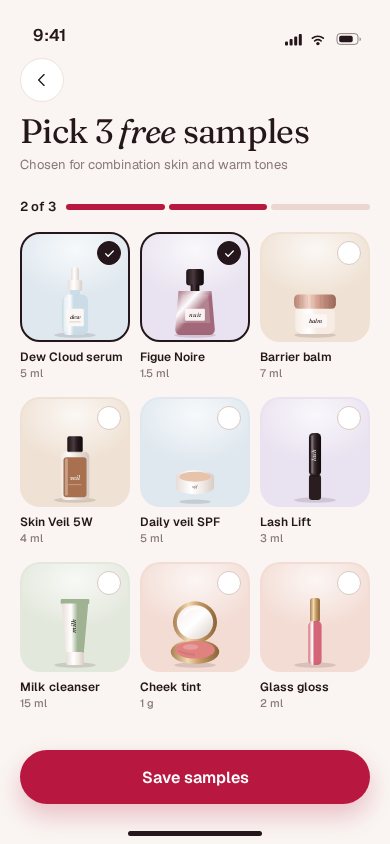
A form screen from Blush, a beauty and makeup shopping app template in a Luxury style. Screen 16 of 25.
Blush is a complete beauty store: welcome, a beauty profile for skin tone, type and concerns, sign in, a home with an edit and picks for you, shop by category, search, a lipstick results grid with filters, a product page with shade beads, a live virtual try on, reviews with a rating breakdown, a brand page, a skincare routine, loves, a bag with free samples, checkout, order placed, live delivery tracking, orders, the Blush Club points dashboard, a Blush Plus plan, notifications, profile and settings. Porcelain and white with aubergine ink and lacquer rouge.
| Detail | Value |
|---|---|
| Screen type | Form |
| App | Blush: Beauty and makeup shopping |
| Category | Lifestyle |
| Design language | Luxury, light |
| Type | Fraunces for headings, Geist for text |
| Colours | #faf5f2 background, #ffffff surface, #24161a text, #8a787c text-muted, #b8183f accent, #ffffff accent-contrast, #f3dcd4 secondary, #eee2dd border, #2f7a5b success |
What this screen says
- Pick 3 free samples
- Chosen for combination skin and warm tones
- 2 of 3
- Dew Cloud serum5 ml
- Figue Noire1.5 ml
- Barrier balm7 ml
- Skin Veil 5W4 ml
- Daily veil SPF5 ml
- Lash Lift3 ml
- Milk cleanser15 ml
- Cheek tint1 g
- Glass gloss2 ml
- Save samples
Around it in Blush
More form and input screens
- Dorm Filters: Find student housing
- Hem Alteration: Tailoring and alterations, collected
- Lendly Return: Borrow things from neighbours
- Stub Transfer: Fan to fan ticket resale
- Trove Save: Visual ideas and boards
- Vidi Details: Video platform for creators
- Roll New album: Photo library and backups
- Splice Speed: Video editor for short clips
- Flatpack Assembly: Furniture store with room previews
- Column Compose: Newsletters and independent writers
- Fetch Add pet: Dog walkers and pet sitters
- Forecourt Finance: Buy and sell used cars
Every lifestyle app form screen
What makes a good form screen
- Ask only what you need. Every field is a reason to stop. Remove optional fields or move them to later.
- Labels above fields. Visible labels stay readable while people type; placeholder-only labels disappear.
- Use the right keyboard and input. Number pads for amounts, email keyboards for email, pickers for dates and autofill for addresses and codes.
- Validate as people go. Show problems next to the field when people leave it, in words that say how to fix them.
The full form screen guide and every example
Remix Blush free: describe your own app and it is drawn in this design. Or get its files from $10: Figma, React Native, SwiftUI, Flutter and HTML.