Templates · Sign in and sign up screens · Finance app · Billable
Billable Create account screen
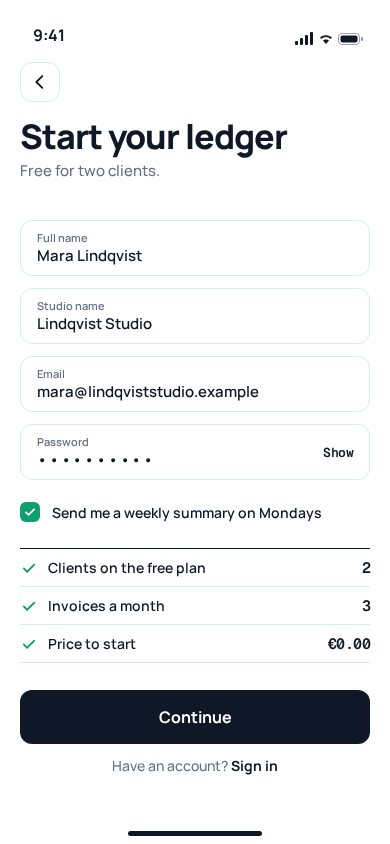
A sign in screen from Billable, a finance app template in a Minimal style. Screen 3 of 25.
Billable is billable covers a freelancer's whole billing loop: run a timer per client, review the day and the week as blocks of hours, manage clients and projects, then build, send and chase invoices. Reports, notifications, a Pro plan, profile and settings round it out.
| Detail | Value |
|---|---|
| Screen type | Sign in |
| App | Billable: Time tracking and invoices, kept like a ledger |
| Category | Finance |
| Design language | Minimal, light |
| Type | Manrope |
| Colours | #ffffff background, #f1faf5 surface, #101828 text, #667085 text-muted, #0e9f6e accent, #ffffff accent-contrast, #f59e0b secondary, #d5eee2 border, #d92d20 danger |
What this screen says
- Start your ledger
- Free for two clients.
- Full name Mara Lindqvist
- Studio name Lindqvist Studio
- Email mara@lindqviststudio.example
- Password ••••••••••Show
- Send me a weekly summary on Mondays
- Clients on the free plan 2
- Invoices a month 3
- Price to start €0.00
- Continue
- Have an account? Sign in
Around it in Billable
More sign in and sign up screens
- Giftly Sign in: Gift cards, sent and stored
- Zap Sign in: Pay friends with a note
- Billfold Sign in: Cards, passes and tickets wallet
- Payly Sign in: UPI payments, recharges and bills
- Crest Sign in: Credit card bills and rewards
- Storefront Sign in: Run your online store
- Bastion Sign in: Everyday banking from a big bank
- Later Sign in: Buy now, pay in four
- Standing Create account: Credit score and reports
- Accrue Sign in: Retirement and pension planner
- Levy Sign in: Taxes for freelancers
- Bullion Sign in: Gold and silver savings
Every finance app sign in screen
What makes a good login screen
- Offer the fastest option first. Sign in with Apple, Google or a passkey takes one tap. If you support them, put them above the email form. Apple asks apps that use a third-party login like Google to also offer an equivalent privacy-focused option, such as Sign in with Apple.
- Separate sign in from sign up clearly. Use different headings and buttons, and a clear link to switch. People who already have an account should never end up creating a second one by accident.
- Use the right keyboard and autofill. Email fields should open the email keyboard and support password managers and one-time code autofill. Small details, big difference in how many people get through.
- Write errors that help. "That password doesn't match this email" is better than "Error 401". Keep what people typed so they only fix the part that was wrong.
The full login screen guide and every example
Remix Billable free: describe your own app and it is drawn in this design. Or get its files from $10: Figma, React Native, SwiftUI, Flutter and HTML.