Templates · Form and input screens · Productivity app · Beacon
Beacon Add tag screen
A form screen from Beacon, a productivity app template in a Glass style. Screen 19 of 25.
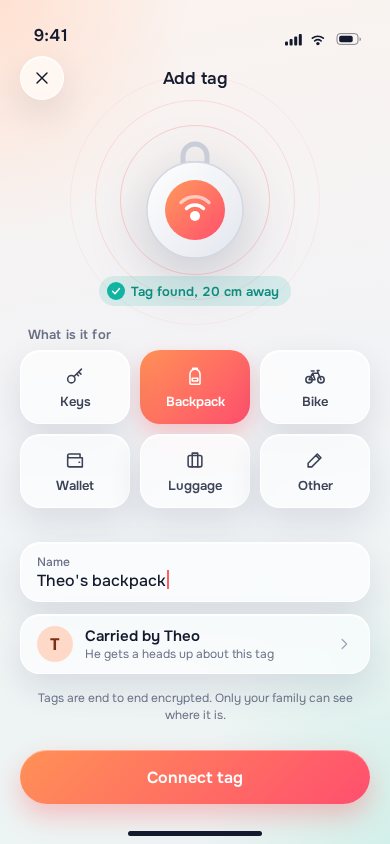
Beacon is a complete location sharing and finder app: welcome, sign in and location access, a people map with a glass sheet, a person with arrival alerts and sharing, search, a devices map, a device with play sound, directions and nearby finding, lost mode with review and confirmation, item tags with pairing, history and left behind alerts, a battery and safety overview, alerts, a Plus plan, your profile and settings. Warm map greys and frosted white glass with a coral beacon and teal.
| Detail | Value |
|---|---|
| Screen type | Form |
| App | Beacon: Find your devices and people |
| Category | Productivity |
| Design language | Glass, light |
| Type | Bricolage Grotesque for headings, Onest for text |
| Colours | #f2f3f6 background, #ffffff surface, #141a2e text, #6b7287 text-muted, #ff5a64 accent, #ffffff accent-contrast, #12b3a0 secondary, #e6e8ee border, #e5484d danger |
What this screen says
- Add tag
- Tag found, 20 cm away
- What is it for
- Keys
- Backpack
- Bike
- Wallet
- Luggage
- Other
- Name
- Theo's backpack
- Carried by TheoHe gets a heads up about this tag
- Tags are end to end encrypted. Only your family can see where it is.
- Connect tag
Around it in Beacon
More form and input screens
- Tunnel Double hop: VPN and online privacy
- Ping Report issue: Internet speed test
- Glance Price alert: Visual search with the camera
- Replay New recording: Record and share screen videos
- Easel Workspace: Collaborative whiteboard
- Token Add account: Two-factor codes and sign-in approvals
- Beam Pick files: Send big files
- Parchment Text style: Documents, edit and share
- Lectern Format: Slides and presenter remote
- Ringer New contact: Phone, contacts and voicemail
- Pipeline Check in: Sales CRM on the road
- Aim Check in: Goals and key results
Every productivity app form screen
What makes a good form screen
- Ask only what you need. Every field is a reason to stop. Remove optional fields or move them to later.
- Labels above fields. Visible labels stay readable while people type; placeholder-only labels disappear.
- Use the right keyboard and input. Number pads for amounts, email keyboards for email, pickers for dates and autofill for addresses and codes.
- Validate as people go. Show problems next to the field when people leave it, in words that say how to fix them.
The full form screen guide and every example
Remix Beacon free: describe your own app and it is drawn in this design. Or get its files from $10: Figma, React Native, SwiftUI, Flutter and HTML.