Templates · Form and input screens · Lifestyle app · Bazaar
Bazaar Listing details screen
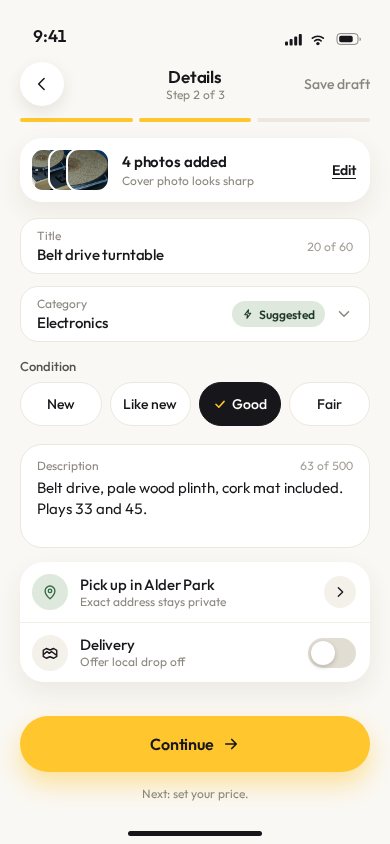
A form screen from Bazaar, a local buy and sell app template in a Minimal style. Screen 16 of 25.
Bazaar is a complete local marketplace app: welcome, sign in, a home grid of listings near you, categories, search with filters, a listing page with a gallery and a seller card, chat with offers and an offer keypad, a four step sell flow with photo slots and a suggested price range, listing stats and boosts, a safe meet up screen, saved items, profile and settings. Warm white with ink, sunflower yellow and sage.
| Detail | Value |
|---|---|
| Screen type | Form |
| App | Bazaar: Local buy and sell |
| Category | Lifestyle |
| Design language | Minimal, light |
| Type | Outfit |
| Colours | #faf8f4 background, #ffffff surface, #17161a text, #8a867d text-muted, #ffc62e accent, #17161a accent-contrast, #dfe8dc secondary, #ece8df border, #d9483b danger |
What this screen says
- DetailsStep 2 of 3
- Save draft
- 4 photos added
- Cover photo looks sharp
- Edit
- Title
- Belt drive turntable
- 20 of 60
- Category
- Electronics
- Suggested
- Condition
- New Like new Good Fair
- Description
- Belt drive, pale wood plinth, cork mat included. Plays 33 and 45.
- 63 of 500
- Pick up in Alder Park
- Exact address stays private
- Delivery
- Offer local drop off
- Continue
- Next: set your price.
Around it in Bazaar
More form and input screens
- Drizzle Edit widget: Weather with living skies
- Shelf Log progress: Reading tracker and book club
- Marquee Write a review: Cinema tickets and watchlist
- Handy Address: Home services
- Tasker Task details: Book and do local odd jobs
- Toolbox Calculator: Hardware store and project lists
- Brief Poll: News in sixty words
- Kibble Edit autoship: Pet supplies and autoship
- Filmlog Log film: Film diary and reviews
- Guardrail Daily limits: Parental controls and screen time
- Collar Edit zone: GPS pet tracker
- Postage Your address: Send parcels and find drop-off points
Every lifestyle app form screen
What makes a good form screen
- Ask only what you need. Every field is a reason to stop. Remove optional fields or move them to later.
- Labels above fields. Visible labels stay readable while people type; placeholder-only labels disappear.
- Use the right keyboard and input. Number pads for amounts, email keyboards for email, pickers for dates and autofill for addresses and codes.
- Validate as people go. Show problems next to the field when people leave it, in words that say how to fix them.
The full form screen guide and every example
Remix Bazaar free: describe your own app and it is drawn in this design. Or get its files from $10: Figma, React Native, SwiftUI, Flutter and HTML.