Templates · Form and input screens · Lifestyle app · Guardrail
Guardrail Daily limits screen
A form screen from Guardrail, a parental controls and screen time app template in a Minimal style. Screen 9 of 25.
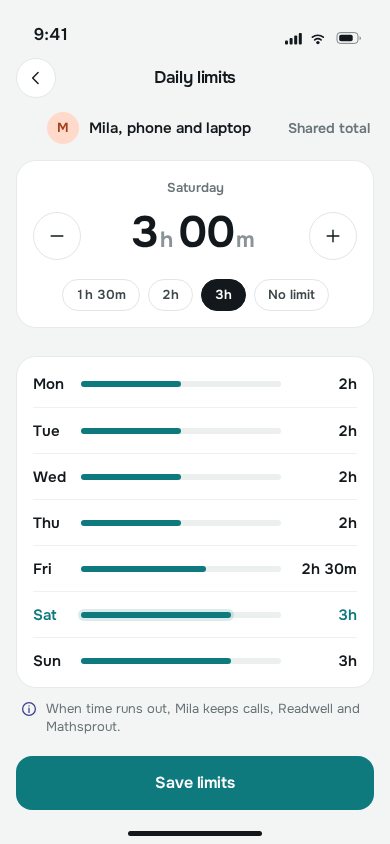
Guardrail is a complete family screen time app for parents: welcome, adding a child, sign in and linking a device, a family home with each child's day rail, a child overview, weekly activity, per app usage, daily and app limits, a bedtime dial, school time, app approval requests with an approved screen, bonus time, content filters by age, live location, devices with lock and ring, notifications, a Plus plan, profile and settings. Pale mist and white with petrol teal, dusk indigo and a warm amber for bonus time.
| Detail | Value |
|---|---|
| Screen type | Form |
| App | Guardrail: Parental controls and screen time |
| Category | Lifestyle |
| Design language | Minimal, light |
| Type | Onest |
| Colours | #f3f5f4 background, #ffffff surface, #12181b text, #687476 text-muted, #0e7a7e accent, #ffffff accent-contrast, #3d3f8f secondary, #e6eae9 border, #e5603f danger |
What this screen says
- Daily limits
- M Mila, phone and laptopShared total
- Saturday
- 3h00m
- 1h 30m 2h 3h No limit
- Mon
- 2h
- Tue
- Wed
- Thu
- Fri
- 2h 30m
- Sat
- 3h
- Sun
- When time runs out, Mila keeps calls, Readwell and Mathsprout.
- Save limits
Around it in Guardrail
More form and input screens
- Collar Edit zone: GPS pet tracker
- Postage Your address: Send parcels and find drop-off points
- Specs Lenses: Glasses with virtual try-on
- Circuit Trade in: Electronics store with trade-in and repairs
- Provenance Make an offer: Authenticated luxury resale
- Gavel Max bid: Live online auctions
- Tidy Your home: Book home cleaners
- Dorm Filters: Find student housing
- Hem Alteration: Tailoring and alterations, collected
- Lendly Return: Borrow things from neighbours
- Stub Transfer: Fan to fan ticket resale
- Trove Save: Visual ideas and boards
Every lifestyle app form screen
What makes a good form screen
- Ask only what you need. Every field is a reason to stop. Remove optional fields or move them to later.
- Labels above fields. Visible labels stay readable while people type; placeholder-only labels disappear.
- Use the right keyboard and input. Number pads for amounts, email keyboards for email, pickers for dates and autofill for addresses and codes.
- Validate as people go. Show problems next to the field when people leave it, in words that say how to fix them.
The full form screen guide and every example
Remix Guardrail free: describe your own app and it is drawn in this design. Or get its files from $10: Figma, React Native, SwiftUI, Flutter and HTML.