Templates · List and feed screens · Finance app · Bastion
Bastion Alerts screen
A list screen from Bastion, a finance app template in an Enterprise style. Screen 21 of 25.
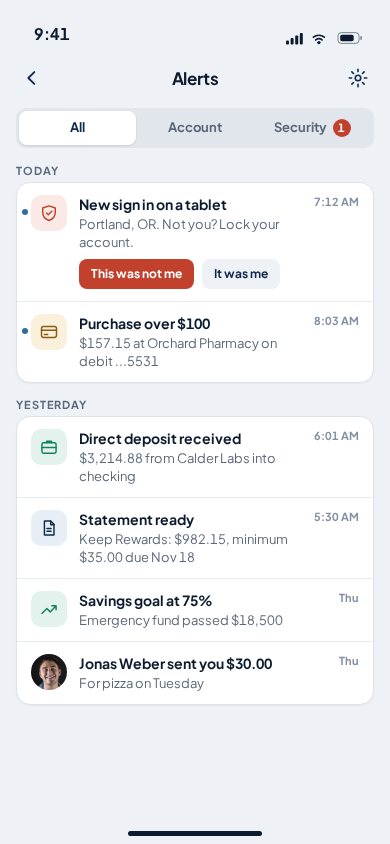
Bastion is a complete big bank app: welcome, sign in, a one time code, an accounts overview, checking, savings and credit card pages, a transaction, the pay and transfer hub, a transfer with review and confirmation, send to a phone or email, bill pay, check deposit with a capture camera, card controls, spending insights, statements, a branch and ATM finder, alerts, secure messages, the Citadel premium tier, profile and settings. Cool grey and white with harbour navy, rampart gold and a quiet green for money in.
| Detail | Value |
|---|---|
| Screen type | List |
| App | Bastion: Everyday banking from a big bank |
| Category | Finance |
| Design language | Enterprise, light |
| Type | Fraunces for headings, Plus Jakarta Sans for text |
| Colours | #eef1f5 background, #ffffff surface, #0c1b2e text, #5b6879 text-muted, #0f2a4a primary, #e3a63c accent, #13805f success, #2f6f9f secondary, #dde3ea border, #c2412d danger |
What this screen says
- Alerts
- All
- Account
- Security 1
- Today
- New sign in on a tablet
- Portland, OR. Not you? Lock your account.
- This was not me
- It was me
- 7:12 AM
- Purchase over $100
- $157.15 at Orchard Pharmacy on debit ...5531
- 8:03 AM
- Yesterday
- Direct deposit received
- $3,214.88 from Calder Labs into checking
- 6:01 AM
- Statement ready
- Keep Rewards: $982.15, minimum $35.00 due Nov 18
- 5:30 AM
- Savings goal at 75%
- Emergency fund passed $18,500
- Thu
- Jonas Weber sent you $30.00
- For pizza on Tuesday
Around it in Bastion
More list and feed screens
- Giftly Wallet: Gift cards, sent and stored
- Zap Activity: Pay friends with a note
- Billfold Transactions: Cards, passes and tickets wallet
- Payly Plans: UPI payments, recharges and bills
- Crest Cards: Credit card bills and rewards
- Storefront Orders: Run your online store
- Later Payments: Buy now, pay in four
- Standing Report: Credit score and reports
- Accrue Pots: Retirement and pension planner
- Levy Income: Taxes for freelancers
- Bullion Holdings: Gold and silver savings
- Wage Shifts: Get paid as you work
What makes a good list screen
- Show what people need to decide. Each row should carry just enough to choose: a title, one or two details and a status. Everything else belongs on the detail screen.
- Keep rows consistent. The same information in the same place on every row lets people scan down a column instead of reading each item.
- Group with headings. Dates, categories or status headings break long lists into chunks people can skip through.
- Make common actions quick. Swipe actions, a checkbox or a heart on the row save opening the item for small tasks.
The full list screen guide and every example
Remix Bastion free: describe your own app and it is drawn in this design. Or get its files from $10: Figma, React Native, SwiftUI, Flutter and HTML.