Templates · List and feed screens · Travel app · Aloft
Aloft Departures screen
A list screen from Aloft, a flight tracker app template in a Dark-first style. Screen 11 of 25.
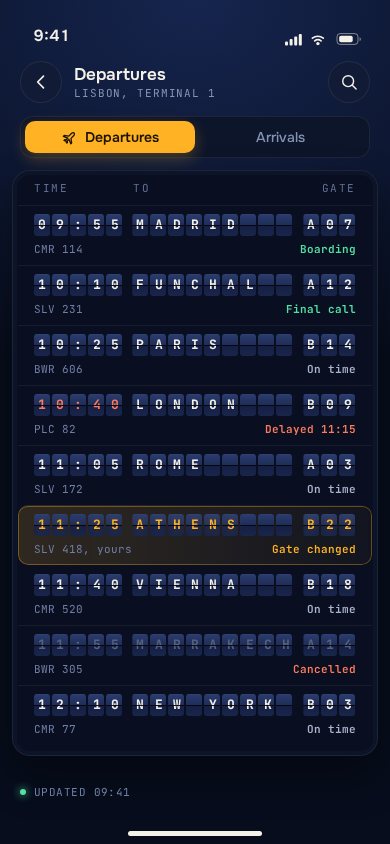
Aloft is a complete flight companion: welcome, sign in and a code, adding a flight, a home built around the next departure, my flights, flight details, a live flight on a dotted map with a route arc, gate change alerts, the departures board, the airport with wait times and a terminal map, a bag tracker, check in, seat choice and the boarding pass, lounges and a lounge pass, a delay forecast, a yearly flight log, a Plus plan, alerts, profile and settings. Airport codes, times and gates sit on split-flap tiles in amber mono type.
| Detail | Value |
|---|---|
| Screen type | List |
| App | Aloft: Flight tracker |
| Category | Travel |
| Design language | Dark-first, dark |
| Type | Onest |
| Colours | #070d1c background, #0f1830 surface, #f4f1e8 text, #8492b4 text-muted, #ffb224 accent, #1c1300 accent-contrast, #54e0a4 secondary, #1d2947 border, #ff7a5c danger |
What this screen says
- Departures
- Lisbon, terminal 1
- Arrivals
- TIME TO GATE
- 09:55MADRID A07
- CMR 114Boarding
- 10:10FUNCHAL A12
- SLV 231Final call
- 10:25PARIS B14
- BWR 606On time
- 10:40LONDON B09
- PLC 82Delayed 11:15
- 11:05ROME A03
- SLV 172On time
- 11:25ATHENS B22
- SLV 418, yoursGate changed
- 11:40VIENNA B18
- CMR 520On time
- 11:55MARRAKECHA14
- BWR 305Cancelled
- 12:10NEW YORK B03
- CMR 77On time
- UPDATED 09:41
Around it in Aloft
More list and feed screens
- Permit Documents: Visas and travel documents wallet
- Backroad Trips: Road trip planner with stops
- Bunk Hostels: Hostels and backpacker meetups
- Piazza Tours: Self-guided city walking tours
- Fjord Itinerary: Cruise companion on board
- Atlas Reviews: Maps and navigation
- Kerb History: Parking that reads like a road sign
- Linea Routes: City transit
- Hollow Results: Cabin and boutique stays
- Pitch Trips: Campsite booking and trip kit
- Hail Message driver: Ride hailing
- Volta Notifications: EV charging
What makes a good list screen
- Show what people need to decide. Each row should carry just enough to choose: a title, one or two details and a status. Everything else belongs on the detail screen.
- Keep rows consistent. The same information in the same place on every row lets people scan down a column instead of reading each item.
- Group with headings. Dates, categories or status headings break long lists into chunks people can skip through.
- Make common actions quick. Swipe actions, a checkbox or a heart on the row save opening the item for small tasks.
The full list screen guide and every example
Remix Aloft free: describe your own app and it is drawn in this design. Or get its files from $10: Figma, React Native, SwiftUI, Flutter and HTML.