Templates · Detail screens · Travel app · Aloft
Aloft Airport screen
A detail screen from Aloft, a flight tracker app template in a Dark-first style. Screen 12 of 25.
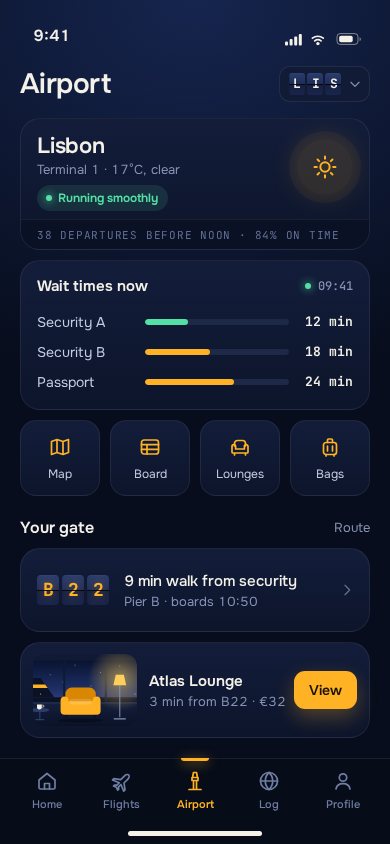
Aloft is a complete flight companion: welcome, sign in and a code, adding a flight, a home built around the next departure, my flights, flight details, a live flight on a dotted map with a route arc, gate change alerts, the departures board, the airport with wait times and a terminal map, a bag tracker, check in, seat choice and the boarding pass, lounges and a lounge pass, a delay forecast, a yearly flight log, a Plus plan, alerts, profile and settings. Airport codes, times and gates sit on split-flap tiles in amber mono type.
| Detail | Value |
|---|---|
| Screen type | Detail |
| App | Aloft: Flight tracker |
| Category | Travel |
| Design language | Dark-first, dark |
| Type | Onest |
| Colours | #070d1c background, #0f1830 surface, #f4f1e8 text, #8492b4 text-muted, #ffb224 accent, #1c1300 accent-contrast, #54e0a4 secondary, #1d2947 border, #ff7a5c danger |
What this screen says
- Airport
- LIS
- LisbonTerminal 1 · 17°C, clear
- Running smoothly
- 38 DEPARTURES BEFORE NOON · 84% ON TIME
- Wait times now
- Security A
- 12 min
- Security B
- 18 min
- Passport
- 24 min
- Map
- Board
- Lounges
- Bags
- Your gateRoute
- B22
- 9 min walk from securityPier B · boards 10:50
- Atlas Lounge3 min from B22 · €32
- View
- Home
- Flights
- Log
- Profile
Around it in Aloft
More detail screens
- Detour Station: Community driving navigation
- Convoy Ride: Carpooling between cities
- Manifest Itinerary: Trip plans from your confirmation emails
- Roadster Controls: Your electric car, from your phone
- Fairground Ride: Theme park tickets, wait times and map
- Scooter: E-scooter and e-bike rental
- Nomad Country: Travel eSIM data plans
- Tern Sailing: Ferry and island hopping
- Berth Journey: Night trains and sleeper cabins
- Caravan Van: Campervan rental and road trips
- Layover Flight: Airport guide, gates and lounges
- Permit Passport: Visas and travel documents wallet
Every travel app detail screen
What makes a good detail screen
- Lead with what identifies the item. A large image or title, the price or status, and the key facts at the top. People should know they are in the right place at a glance.
- Keep the main action visible. A sticky bottom button for Add to cart, Book or Play stays reachable while people scroll through details.
- Order information by importance. The facts that decide the choice come first; reviews, specifications and fine print further down.
- Use progressive disclosure. Long descriptions, specifications and policies can expand on tap rather than filling the screen.
The full detail screen guide and every example
Remix Aloft free: describe your own app and it is drawn in this design. Or get its files from $10: Figma, React Native, SwiftUI, Flutter and HTML.