Templates · List and feed screens · Education app · Almanac
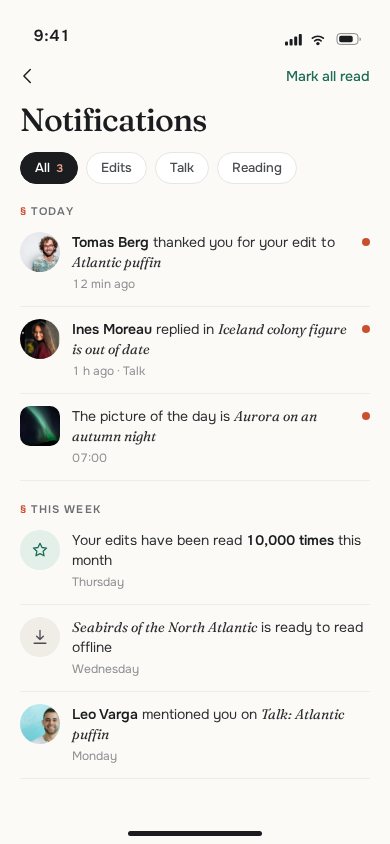
Almanac Notifications screen
A list screen from Almanac, an education app template in a Minimal style. Screen 23 of 25.
Almanac is a complete encyclopedia reader: welcome, sign in, an explore feed with the featured article, trending reads, on this day and the picture of the day, a full article with contents, quick facts and link previews, search with suggestions and results, saved reading lists, a map of articles nearby, page history, talk threads, section editing, the same article in 74 languages, reading stats, and a supporter plan with a donation, receipt, notifications, profile and settings. Paper white and ink, with viridian links and one vermilion accent.
| Detail | Value |
|---|---|
| Screen type | List |
| App | Almanac: The free encyclopedia reader |
| Category | Education |
| Design language | Minimal, light |
| Type | Fraunces for headings, Onest for text |
| Colours | #fbfaf6 background, #ffffff surface, #1a1c1f text, #6c6e72 text-muted, #1d6b58 accent, #e3efe9 accent-tint, #c8502f secondary, #f3efe5 parchment, #e8e6df border |
What this screen says
- Mark all read
- Notifications
- All 3 Edits Talk Reading
- §Today
- Tomas Berg thanked you for your edit to Atlantic puffin
- 12 min ago
- Ines Moreau replied in Iceland colony figure is out of date
- 1 h ago · Talk
- The picture of the day is Aurora on an autumn night
- §This week
- Your edits have been read 10,000 times this month
- Thursday
- Seabirds of the North Atlantic is ready to read offline
- Wednesday
- Leo Varga mentioned you on Talk: Atlantic puffin
- Monday
Around it in Almanac
More list and feed screens
- Parla Review: Language learning
- Recall Notifications: Flashcards and spaced repetition
- Numo World map: Kids maths game
- Syntax Notifications: Learn to code
- Tuckin Notifications: Bedtime stories for kids
- Zenith Planets: Night sky guide
- Chalk Category: Design courses
- Encore Notifications: Creator courses
- Classroom Classwork: Class stream and assignments
- Studyhall Assigned: Free lessons and practice for school
- Tutor Reviews: Book online tutors for any skill
- Leaf Library: E-books and reading
Every education app list screen
What makes a good list screen
- Show what people need to decide. Each row should carry just enough to choose: a title, one or two details and a status. Everything else belongs on the detail screen.
- Keep rows consistent. The same information in the same place on every row lets people scan down a column instead of reading each item.
- Group with headings. Dates, categories or status headings break long lists into chunks people can skip through.
- Make common actions quick. Swipe actions, a checkbox or a heart on the row save opening the item for small tasks.
The full list screen guide and every example
Remix Almanac free: describe your own app and it is drawn in this design. Or get its files from $10: Figma, React Native, SwiftUI, Flutter and HTML.