Templates · Paywall screens · Food app · Agave
Agave Reserve screen
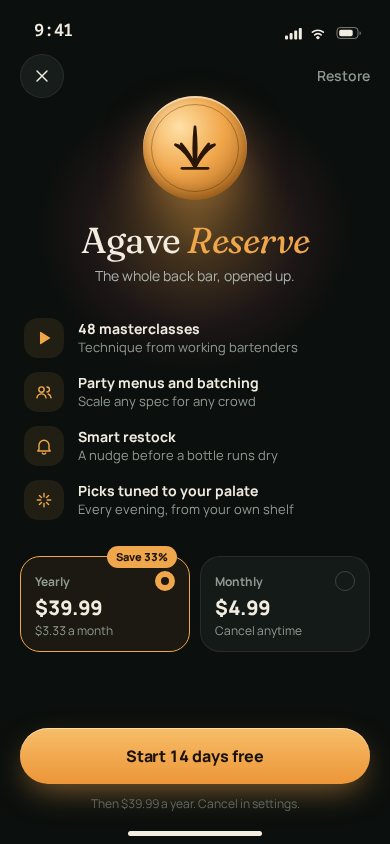
A paywall screen from Agave, a cocktails and home bar app template in a Dark-first style. Screen 22 of 25.
Agave is a complete home bar app: welcome, palate setup and an age checked sign up, a Tonight home that knows what you can pour, explore and collections, a recipe with a labelled pour diagram, a guided shake timer and a masterclass player, your bottle shelf with fill levels, a bottle page, label scanning, what you can make, a party batch calculator, restocking with checkout, a delivery map and confirmation, a tasting log and journal, drinking insights with mindful units, a Reserve plan, notifications, profile and settings. Near black and cream with mezcal amber, hibiscus and jade.
| Detail | Value |
|---|---|
| Screen type | Paywall |
| App | Agave: Cocktails and home bar |
| Category | Food |
| Design language | Dark-first, dark |
| Type | Fraunces for headings, Manrope for text |
| Colours | #0b0f0d background, #141a17 surface, #f3ece0 text, #8f9a92 text-muted, #f0a64a accent, #1a1207 accent-contrast, #ec6a7e secondary, #7fcfae success, rgba(243,236,224,0.08) border |
What this screen says
- Restore
- Agave Reserve
- The whole back bar, opened up.
- 48 masterclasses
- Technique from working bartenders
- Party menus and batching
- Scale any spec for any crowd
- Smart restock
- A nudge before a bottle runs dry
- Picks tuned to your palate
- Every evening, from your own shelf
- Save 33%Yearly$39.99$3.33 a month
- Monthly$4.99Cancel anytime
- Start 14 days free
- Then $39.99 a year. Cancel in settings.
Around it in Agave
More paywall screens
- Ladle Plus: Recipes and meal planning
- Pantry Plus: Grocery delivery
- Brewly Club: Coffee ordering and loyalty
- Tabla Noir: Tables worth dressing for
- Corked Reserve: Wine journal and cellar
- Crumb Club: Neighbourhood bakery
- Tiffin One: Food delivery
- Courier Plus: Food delivery driver app
- Picker Priority: Grocery shopper app
- Queue Plus: Join the waitlist from anywhere
- Nosh Plus: Local restaurant reviews
- Buns Club: Burger chain ordering and deals
What makes a good paywall screen
- Lead with the outcome, not the feature list. The headline should say what changes for the person: "Train smarter every week" beats "Unlock Premium". Three to five benefits underneath are enough; more turns into a wall of ticks nobody reads.
- Show the real price, period and trial terms. State the price, how often it renews and when a free trial turns into a charge, near the button. Apple's App Store guideline 3.1.2 asks subscription apps to make this clear before purchase, and Google Play has similar rules.
- One primary button. The main call to action should be impossible to miss and say what happens: "Start 7-day free trial" or "Subscribe for $4.99/month". A second plan choice is fine; a second competing button is not.
- Make the plans easy to compare. When you offer monthly and yearly, show both prices in the same unit (per month or per week) and mark the saving on the yearly plan in plain numbers, not just a badge.
The full paywall screen guide and every example
Remix Agave free: describe your own app and it is drawn in this design. Or get its files from $10: Figma, React Native, SwiftUI, Flutter and HTML.