Templates · Paywall screens · Food app · Buns
Buns Club screen
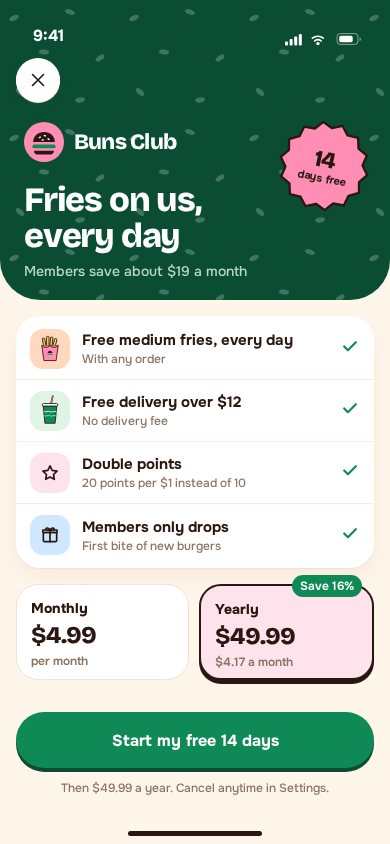
A paywall screen from Buns, a burger chain ordering and deals app template in a Playful style. Screen 22 of 25.
Buns is a complete burger chain app: welcome, sign in, a home with today's deals and a reorder, nearby restaurants on a map, the menu, an item with sizes and a meal upgrade, customizing toppings, picking a side and drink, the bag, how to pick up (counter, drive-thru, curbside, table or delivery), checkout and an order placed screen, a drive-thru order code, live delivery, deals and a deal, rewards points with a redeem code, scanning a receipt, past orders, nutrition, a Buns Club plan, notifications, profile and settings. Bun cream with pickle green, bubblegum pink and cocoa.
| Detail | Value |
|---|---|
| Screen type | Paywall |
| App | Buns: Burger chain ordering and deals |
| Category | Food |
| Design language | Playful, light |
| Type | Bricolage Grotesque for headings, Onest for text |
| Colours | #fff6ea background, #ffffff surface, #2a1710 text, #8b7464 text-muted, #0f8a56 accent, #ffffff accent-contrast, #ff8db4 secondary, #f1e3d3 border, #e5574a danger |
What this screen says
- Buns Club
- Fries on us, every day
- Members save about $19 a month
- 14days free
- Free medium fries, every dayWith any order
- Free delivery over $12No delivery fee
- Double points20 points per $1 instead of 10
- Members only dropsFirst bite of new burgers
- Monthly$4.99per month
- Save 16% Yearly$49.99$4.17 a month
- Start my free 14 days
- Then $49.99 a year. Cancel anytime in Settings.
Around it in Buns
More paywall screens
- Tiffin One: Food delivery
- Courier Plus: Food delivery driver app
- Picker Priority: Grocery shopper app
- Queue Plus: Join the waitlist from anywhere
- Nosh Plus: Local restaurant reviews
- Slice Pass: Pizza ordering with a live tracker
- Crate Plus: Meal kits delivered weekly
- Dash Pass: Ten minute grocery delivery
- Aisle Plus: Shared grocery lists
- Menu Plus: Scan, order and pay at the table
- Mart Plus: Supermarket app with loyalty and scan and go
- Rescue Plus: Surprise bags of surplus food
What makes a good paywall screen
- Lead with the outcome, not the feature list. The headline should say what changes for the person: "Train smarter every week" beats "Unlock Premium". Three to five benefits underneath are enough; more turns into a wall of ticks nobody reads.
- Show the real price, period and trial terms. State the price, how often it renews and when a free trial turns into a charge, near the button. Apple's App Store guideline 3.1.2 asks subscription apps to make this clear before purchase, and Google Play has similar rules.
- One primary button. The main call to action should be impossible to miss and say what happens: "Start 7-day free trial" or "Subscribe for $4.99/month". A second plan choice is fine; a second competing button is not.
- Make the plans easy to compare. When you offer monthly and yearly, show both prices in the same unit (per month or per week) and mark the saving on the yearly plan in plain numbers, not just a badge.
The full paywall screen guide and every example
Remix Buns free: describe your own app and it is drawn in this design. Or get its files from $10: Figma, React Native, SwiftUI, Flutter and HTML.