Templates · Onboarding screens · Food app · Agave
Agave Your palate screen
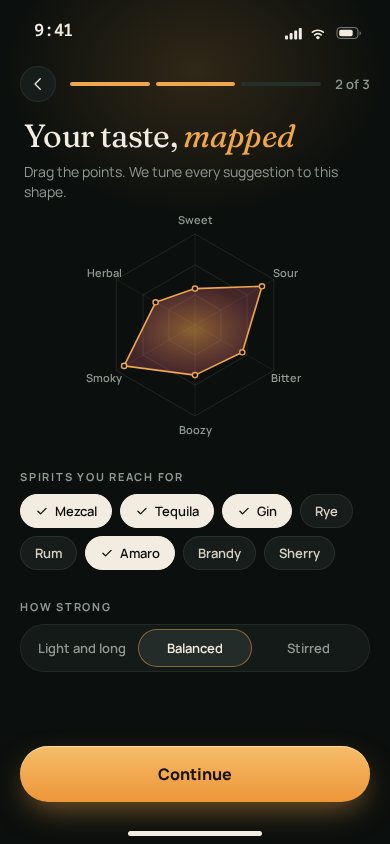
An onboarding screen from Agave, a cocktails and home bar app template in a Dark-first style. Screen 2 of 25.
Agave is a complete home bar app: welcome, palate setup and an age checked sign up, a Tonight home that knows what you can pour, explore and collections, a recipe with a labelled pour diagram, a guided shake timer and a masterclass player, your bottle shelf with fill levels, a bottle page, label scanning, what you can make, a party batch calculator, restocking with checkout, a delivery map and confirmation, a tasting log and journal, drinking insights with mindful units, a Reserve plan, notifications, profile and settings. Near black and cream with mezcal amber, hibiscus and jade.
| Detail | Value |
|---|---|
| Screen type | Onboarding |
| App | Agave: Cocktails and home bar |
| Category | Food |
| Design language | Dark-first, dark |
| Type | Fraunces for headings, Manrope for text |
| Colours | #0b0f0d background, #141a17 surface, #f3ece0 text, #8f9a92 text-muted, #f0a64a accent, #1a1207 accent-contrast, #ec6a7e secondary, #7fcfae success, rgba(243,236,224,0.08) border |
What this screen says
- 2 of 3
- Your taste, mapped
- Drag the points. We tune every suggestion to this shape.
- Spirits you reach for
- Mezcal Tequila Gin Rye Rum Amaro Brandy Sherry
- How strong
- Light and long Balanced Stirred
- Continue
Around it in Agave
More onboarding screens
- Tabla Welcome: Tables worth dressing for
- Corked Welcome: Wine journal and cellar
- Crumb Welcome: Neighbourhood bakery
- Tiffin Welcome: Food delivery
- Courier Welcome: Food delivery driver app
- Picker Welcome: Grocery shopper app
- Queue Welcome: Join the waitlist from anywhere
- Nosh Welcome: Local restaurant reviews
- Buns Welcome: Burger chain ordering and deals
- Slice Welcome: Pizza ordering with a live tracker
- Crate Welcome: Meal kits delivered weekly
- Dash Welcome: Ten minute grocery delivery
Every food app onboarding screen
What makes a good onboarding screen
- One idea per screen. Each screen should say one thing in a headline people can read in a second. If a screen needs a paragraph, it is doing too much.
- Personalise with a purpose. Ask a question only if the answer changes what people see next, like a goal, a level or an interest. Then show that the answer mattered.
- Explain permissions before asking. Show your own screen saying why you need notifications, location or the camera before the system prompt. People who understand the reason are more likely to allow it.
- Let people skip. A visible skip or "I'll do this later" respects returning users and the impatient. Make sure skipping still lands them somewhere useful.
The full onboarding screen guide and every example
Remix Agave free: describe your own app and it is drawn in this design. Or get its files from $10: Figma, React Native, SwiftUI, Flutter and HTML.