Templates · List and feed screens · Food app · Agave
Agave Can make screen
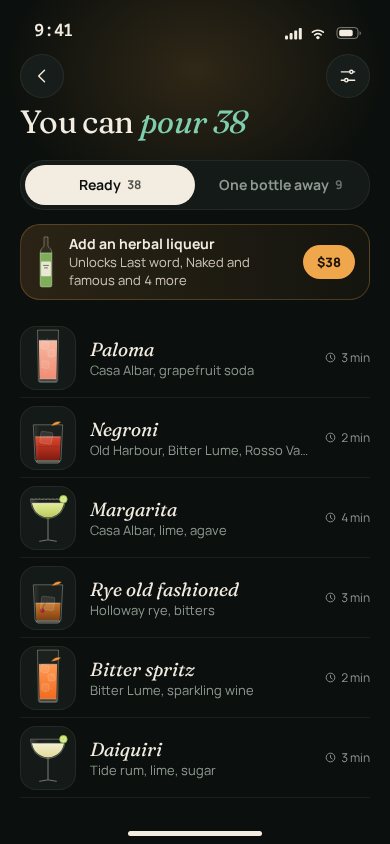
A list screen from Agave, a cocktails and home bar app template in a Dark-first style. Screen 13 of 25.
Agave is a complete home bar app: welcome, palate setup and an age checked sign up, a Tonight home that knows what you can pour, explore and collections, a recipe with a labelled pour diagram, a guided shake timer and a masterclass player, your bottle shelf with fill levels, a bottle page, label scanning, what you can make, a party batch calculator, restocking with checkout, a delivery map and confirmation, a tasting log and journal, drinking insights with mindful units, a Reserve plan, notifications, profile and settings. Near black and cream with mezcal amber, hibiscus and jade.
| Detail | Value |
|---|---|
| Screen type | List |
| App | Agave: Cocktails and home bar |
| Category | Food |
| Design language | Dark-first, dark |
| Type | Fraunces for headings, Manrope for text |
| Colours | #0b0f0d background, #141a17 surface, #f3ece0 text, #8f9a92 text-muted, #f0a64a accent, #1a1207 accent-contrast, #ec6a7e secondary, #7fcfae success, rgba(243,236,224,0.08) border |
What this screen says
- You can pour 38
- Ready 38 One bottle away 9
- Add an herbal liqueurUnlocks Last word, Naked and famous and 4 more
- Paloma
- Casa Albar, grapefruit soda
- 3 min
- Negroni
- Old Harbour, Bitter Lume, Rosso Vanni
- 2 min
- Margarita
- Casa Albar, lime, agave
- 4 min
- Rye old fashioned
- Holloway rye, bitters
- Bitter spritz
- Bitter Lume, sparkling wine
- Daiquiri
- Tide rum, lime, sugar
Around it in Agave
More list and feed screens
- Forage In season: Farmers market and veg box
- Ember Cook log: Smoker and grill thermometer
- Steep Shelf: Tea brewing and tasting notes
- Brigade Stations: Restaurant kitchen and line ops
- Nibs Swaps: Food allergy and label scanner
- Ladle Week plan: Recipes and meal planning
- Pantry Fruit and veg: Grocery delivery
- Brewly Menu: Coffee ordering and loyalty
- Tabla Reviews: Tables worth dressing for
- Corked Notifications: Wine journal and cellar
- Crumb Menu: Neighbourhood bakery
- Tiffin Restaurants: Food delivery
What makes a good list screen
- Show what people need to decide. Each row should carry just enough to choose: a title, one or two details and a status. Everything else belongs on the detail screen.
- Keep rows consistent. The same information in the same place on every row lets people scan down a column instead of reading each item.
- Group with headings. Dates, categories or status headings break long lists into chunks people can skip through.
- Make common actions quick. Swipe actions, a checkbox or a heart on the row save opening the item for small tasks.
The full list screen guide and every example
Remix Agave free: describe your own app and it is drawn in this design. Or get its files from $10: Figma, React Native, SwiftUI, Flutter and HTML.