Templates · Player, camera and editor screens · Lifestyle app · Kibble
Kibble Vet chat screen
A media screen from Kibble, a pet supplies and autoship app template in a Playful style. Screen 20 of 25.
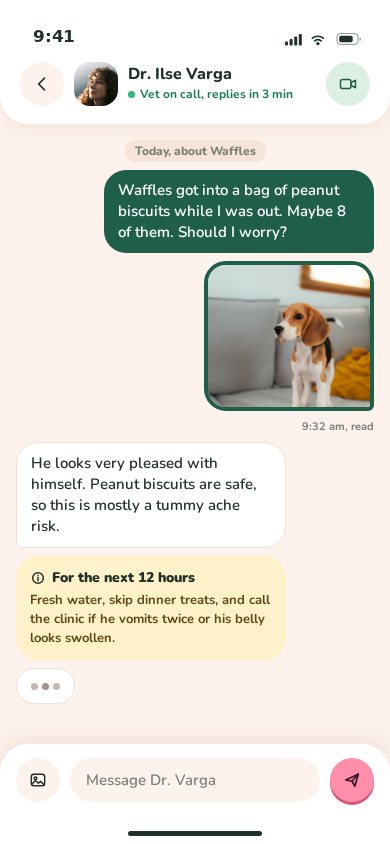
Kibble is a complete pet supplies app: welcome and pet setup, sign in, a home that knows when the food runs out, shop by pet, search with filters, a product page with sizes and autoship savings, reviews, cart, checkout and confirmation, live delivery tracking, orders, autoship schedules and edits, pet profiles with weight and diet, a pharmacy with refill requests, a vet chat, a spend dashboard, a membership plan, notifications, account and settings. Blush cream and white with deep pine green, bubblegum pink and butter yellow.
| Detail | Value |
|---|---|
| Screen type | Media |
| App | Kibble: Pet supplies and autoship |
| Category | Lifestyle |
| Design language | Playful, light |
| Type | Grandstander for headings, Nunito for text |
| Colours | #fdf2ec background, #ffffff surface, #22302b text, #7d817a text-muted, #1f5f4a primary, #143f31 primary-ledge, #ff8fab accent, #e8557e accent-strong, #ffd166 highlight, #dcefe4 mint-tint, #ffe0e6 pink-tint, #fff1c9 butter-tint, #dfeefa sky-tint, #f1e1d8 border |
What this screen says
- Dr. Ilse VargaVet on call, replies in 3 min
- Today, about Waffles
- Waffles got into a bag of peanut biscuits while I was out. Maybe 8 of them. Should I worry?
- 9:32 am, read
- He looks very pleased with himself. Peanut biscuits are safe, so this is mostly a tummy ache risk.
- For the next 12 hoursFresh water, skip dinner treats, and call the clinic if he vomits twice or his belly looks swollen.
- Message Dr. Varga
Around it in Kibble
More player, camera and editor screens
- Inked Try on: Tattoo artists and bookings
- Scrapbook Editor: Digital scrapbook journal
- Rinse Scan label: Laundry pickup and delivery
- Sable Story: Fashion store
- Bazaar Photos: Local buy and sell
- Drape Add item: AI wardrobe and daily outfits
- Mane Camera: AI hairstyle try-on
- Annex New project: AI interior redesign
- Kino Player: Film and series streaming
- Grain Camera: Camera and photo editor
- Fern Identify: Plant care
- Doorstep Gallery: Homes for sale and rent
Every lifestyle app media screen
What makes a good media player screen
- Content takes the space. Artwork, video or the camera view should fill most of the screen.
- Primary controls in the thumb zone. Play and pause, the shutter or the main tool, large and low on the screen.
- Show progress and position. A scrubber with elapsed and remaining time, or the step in a lesson.
- Hide secondary controls until needed. Lyrics, queue, filters and advanced tools can live behind a tap or a swipe.
The full media player screen guide and every example
Remix Kibble free: describe your own app and it is drawn in this design. Or get its files from $10: Figma, React Native, SwiftUI, Flutter and HTML.