Templates · Live tracking screens · Travel app · Wheelhouse
Wheelhouse At pickup screen
A tracking screen from Wheelhouse, a driver app for ride hailing app template in a Dark-first style. Screen 7 of 25.
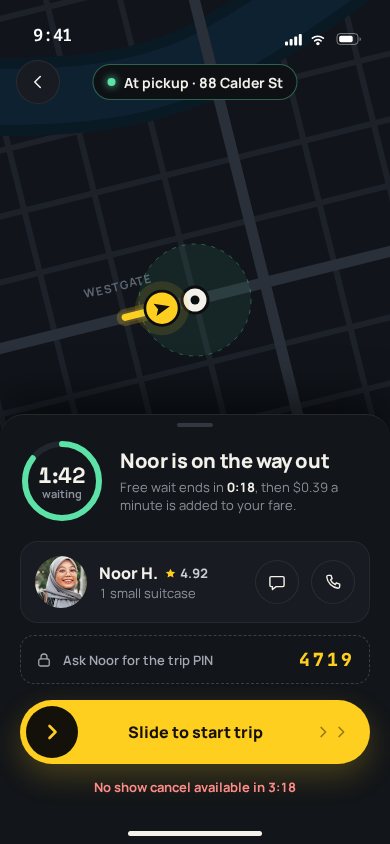
Wheelhouse is a complete ride hailing driver app: welcome and sign in, a home map with a slide to go online, the online state with a demand heat grid, an incoming trip request with fare and countdown, turn by turn navigation to the pickup, waiting at the pickup, rider messages, the trip in progress, trip complete and rating the rider, earnings by week and by day, a trip receipt, instant cash out, the demand map, a destination filter, promotions, a Pro plan, documents, the vehicle, notifications, profile and settings. Blue black asphalt with road marking yellow and mint.
| Detail | Value |
|---|---|
| Screen type | Tracking |
| App | Wheelhouse: Driver app for ride hailing |
| Category | Travel |
| Design language | Dark-first, dark |
| Type | Space Grotesk for headings, Manrope for text |
| Colours | #0b0d11 background, #15181e surface, #f3f1ea text, #8b919c text-muted, #ffcf1f accent, #14110a accent-contrast, #5ce1a6 secondary, #262a32 border, #ff5a5f danger |
What this screen says
- At pickup · 88 Calder St
- 1:42waiting
- Noor is on the way out
- Free wait ends in 0:18, then $0.39 a minute is added to your fare.
- Noor H. 4.92
- 1 small suitcase
- Ask Noor for the trip PIN 4719
- Slide to start trip
- No show cancel available in 3:18
Around it in Wheelhouse
More live tracking screens
- Fare Flight status: Flight search and price alerts
- Ignition Digital key: Car rental from local hosts
- Contrail Flight status: Airline booking, check-in and boarding
- Keycard Order status: Hotel stays, digital key and room service
- Detour Drive: Community driving navigation
- Convoy Live trip: Carpooling between cities
- Manifest Live flight: Trip plans from your confirmation emails
- Roadster Charging: Your electric car, from your phone
- Fairground Map: Theme park tickets, wait times and map
- Scoot Ride: E-scooter and e-bike rental
- Nomad Installing: Travel eSIM data plans
- Tern Live: Ferry and island hopping
Every travel app tracking screen
What makes a good live tracking screen
- The live number is the hero. Arrival time, pace, distance or time left, in large type at the top or centre.
- Show status in words. "Driver is 3 minutes away" or "Halfway there" alongside the map or chart.
- Make it readable while moving. Large numbers, high contrast and big buttons for pause, stop or call.
- Keep updates calm. Smooth movement on the map and steady numbers; jumpy updates feel broken.
The full live tracking screen guide and every example
Remix Wheelhouse free: describe your own app and it is drawn in this design. Or get its files from $10: Figma, React Native, SwiftUI, Flutter and HTML.