Templates · Form and input screens · Finance app · Wage
Wage New pot screen
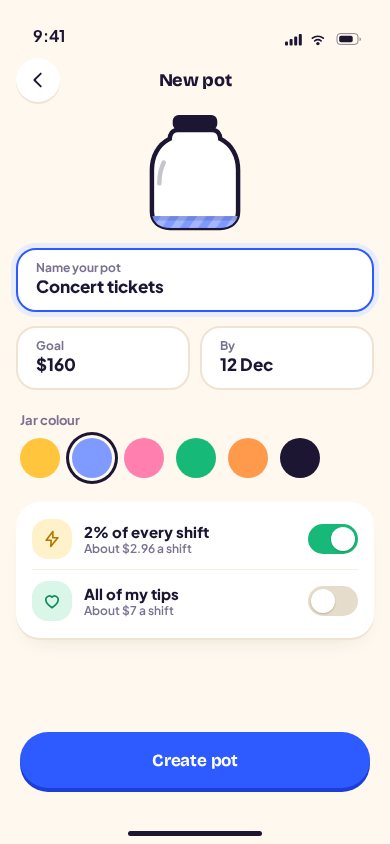
A form screen from Wage, a finance app template in a Playful style. Screen 19 of 25.
Wage is a complete earned wage access app for shift workers: welcome, employer search, sign in and a text code, a home with pay earned so far on an odometer counter, QR clock in, a live shift dial that earns by the minute, the week of shifts, a shift breakdown, open shifts to pick up with bonus pay, cash out with a number pad, instant or free review and a coin burst success, earnings by day, a payslip, tips, savings pots and a new pot, activity, the Wage debit card, notifications, a Wage Plus plan, profile and settings. Cream and white with electric cobalt, coin gold, mint and bubblegum pink.
| Detail | Value |
|---|---|
| Screen type | Form |
| App | Wage: Get paid as you work |
| Category | Finance |
| Design language | Playful, light |
| Type | Bricolage Grotesque for headings, Plus Jakarta Sans for text |
| Colours | #fff8ee background, #ffffff surface, #1c1633 text, #7a7290 text-muted, #2e5bff accent, #ffffff accent-contrast, #ffc53d secondary, #efe4d3 border, #f2483d danger |
What this screen says
- New pot
- Name your potConcert tickets
- Goal$160
- By12 Dec
- Jar colour
- 2% of every shift
- About $2.96 a shift
- All of my tips
- About $7 a shift
- Create pot
Around it in Wage
More form and input screens
- Burrow New pot: Shared savings pots
- Remit Send money: International money transfer
- Piggy Add to jar: Pocket money for kids
- Settle Top up: Bill payments and banking
- Fathom Verify identity: Crypto wallet
- Marigold Verify identity: Mobile banking
- Zentra Swap: Crypto trading
- Payday Run payroll: Payroll for small teams
- Roundup Pick a mix: Invest your spare change
- Envelope Assign: Give every dollar a job
- Recur Cancel: Track and cancel subscriptions
- Keel Request card: Corporate cards and spend controls
What makes a good form screen
- Ask only what you need. Every field is a reason to stop. Remove optional fields or move them to later.
- Labels above fields. Visible labels stay readable while people type; placeholder-only labels disappear.
- Use the right keyboard and input. Number pads for amounts, email keyboards for email, pickers for dates and autofill for addresses and codes.
- Validate as people go. Show problems next to the field when people leave it, in words that say how to fix them.
The full form screen guide and every example
Remix Wage free: describe your own app and it is drawn in this design. Or get its files from $10: Figma, React Native, SwiftUI, Flutter and HTML.