Templates · Form and input screens · Finance app · Burrow
Burrow New pot screen
A form screen from Burrow, a shared savings pots app template in a Playful style. Screen 9 of 25.
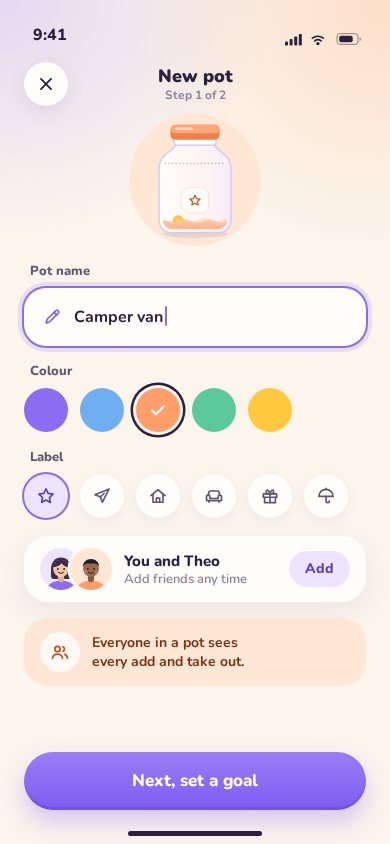
Burrow is a complete shared savings app: welcome, sign in, a code, a home with every pot as a filling jar, the pots list, a pot with its goal, members and activity, starting a pot, setting a goal, adding money on a keypad, saving rules such as round ups, a weekly rule and a payday rule, the shared timeline, members and invites, taking money out, a goal reached celebration, insights, linked accounts, a Plus plan, profile and settings. Each pot keeps one colour everywhere, from its jar to its progress bar.
| Detail | Value |
|---|---|
| Screen type | Form |
| App | Burrow: Shared savings pots |
| Category | Finance |
| Design language | Playful, light |
| Type | Nunito |
| Colours | #fbf5ec background, #fffdf9 surface, #2a2140 text, #8c8399 text-muted, #8b6cf2 accent, #ffffff accent-contrast, #ffa877 secondary, #efe6d8 border, #e5484d danger |
What this screen says
- New pot
- Step 1 of 2
- Pot name
- Camper van
- Colour
- Label
- You and Theo
- Add friends any time
- Add
- Everyone in a pot sees
- every add and take out.
- Next, set a goal
Around it in Burrow
More form and input screens
- Fathom Verify identity: Crypto wallet
- Marigold Verify identity: Mobile banking
- Zentra Swap: Crypto trading
- Payday Run payroll: Payroll for small teams
- Roundup Pick a mix: Invest your spare change
- Envelope Assign: Give every dollar a job
- Recur Cancel: Track and cancel subscriptions
- Keel Request card: Corporate cards and spend controls
- Giftly Card design: Gift cards, sent and stored
- Zap Pay: Pay friends with a note
- Billfold Verify card: Cards, passes and tickets wallet
- Payly Amount: UPI payments, recharges and bills
What makes a good form screen
- Ask only what you need. Every field is a reason to stop. Remove optional fields or move them to later.
- Labels above fields. Visible labels stay readable while people type; placeholder-only labels disappear.
- Use the right keyboard and input. Number pads for amounts, email keyboards for email, pickers for dates and autofill for addresses and codes.
- Validate as people go. Show problems next to the field when people leave it, in words that say how to fix them.
The full form screen guide and every example
Remix Burrow free: describe your own app and it is drawn in this design. Or get its files from $10: Figma, React Native, SwiftUI, Flutter and HTML.