Templates · List and feed screens · Lifestyle app · Vow
Vow Guests screen
A list screen from Vow, a wedding planner app template in a Luxury style. Screen 11 of 25.
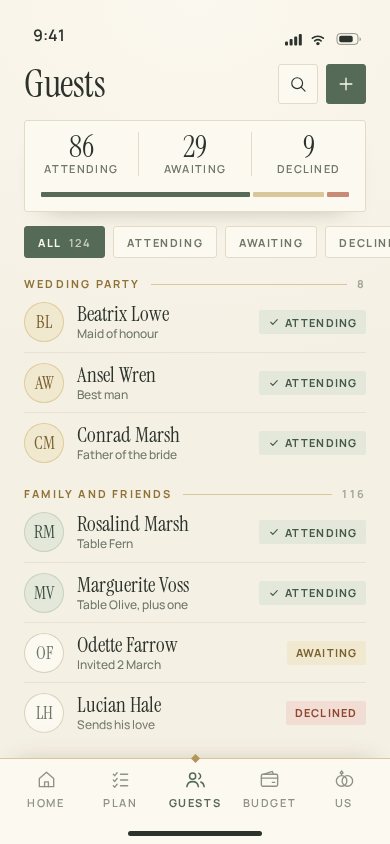
Vow is a complete wedding planner: welcome, sign in, setting up the day, a home with the countdown inside a botanical wreath, a checklist by month, a budget with a category breakdown, the guest list, one guest, RSVPs with meal counts, a seating chart drawn as round tables named after plants, vendors, booking a visit, the day's timeline, the registry, a paid tier, profile and settings. Everything is typeset like fine stationery in ivory, sage and gold.
| Detail | Value |
|---|---|
| Screen type | List |
| App | Vow: Wedding planner |
| Category | Lifestyle |
| Design language | Luxury, light |
| Type | Manrope |
| Colours | #f5f0e4 background, #fcf9f1 surface, #2b332c text, #6f766a text-muted, #556b57 accent, #fcf9f1 accent-contrast, #b39558 secondary, #e3dbc8 border, #a8573f danger |
What this screen says
- Guests
- 86Attending
- 29Awaiting
- 9Declined
- All124 Attending Awaiting Declined
- Wedding party8
- BL
- Beatrix Lowe
- Maid of honour
- Attending
- AW
- Ansel Wren
- Best man
- CM
- Conrad Marsh
- Father of the bride
- Family and friends116
- RM
- Rosalind Marsh
- Table Fern
- MV
- Marguerite Voss
- Table Olive, plus one
- OF
- Odette Farrow
- Invited 2 March
- Awaiting
- LH
- Lucian Hale
- Sends his love
Around it in Vow
More list and feed screens
- Circuit Deals: Electronics store with trade-in and repairs
- Provenance Results: Authenticated luxury resale
- Gavel Auctions: Live online auctions
- Tidy Choose cleaner: Book home cleaners
- Dorm Saved: Find student housing
- Hem Orders: Tailoring and alterations, collected
- Lendly Party gear: Borrow things from neighbours
- Stub Listings: Fan to fan ticket resale
- Trove Boards: Visual ideas and boards
- Vidi Comments: Video platform for creators
- Roll Albums: Photo library and backups
- Splice Add media: Video editor for short clips
Every lifestyle app list screen
What makes a good list screen
- Show what people need to decide. Each row should carry just enough to choose: a title, one or two details and a status. Everything else belongs on the detail screen.
- Keep rows consistent. The same information in the same place on every row lets people scan down a column instead of reading each item.
- Group with headings. Dates, categories or status headings break long lists into chunks people can skip through.
- Make common actions quick. Swipe actions, a checkbox or a heart on the row save opening the item for small tasks.
The full list screen guide and every example
Remix Vow free: describe your own app and it is drawn in this design. Or get its files from $10: Figma, React Native, SwiftUI, Flutter and HTML.