Templates · List and feed screens · Travel app · Volta
Volta History screen
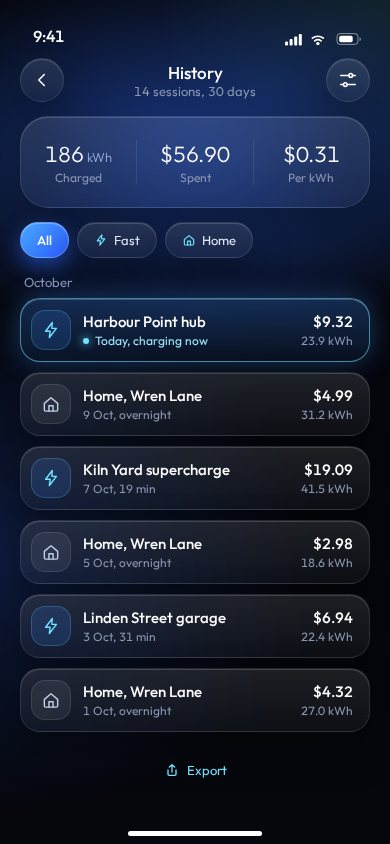
A list screen from Volta, an EV charging app template in a Glass style. Screen 21 of 25.
Volta is a complete EV charging app: welcome, sign in, a code and adding your car, a home with the live charge, a charger map with filters, nearby stations, a station with its stalls, picking a connector, plugging in, a live session, the finished charge and its receipt, a trip planner with charging stops, car status, a home charging schedule, energy stats, history, wallet, a Plus plan, notifications, profile and settings. One electric blue for everything that carries current.
| Detail | Value |
|---|---|
| Screen type | List |
| App | Volta: EV charging |
| Category | Travel |
| Design language | Glass, dark |
| Type | Outfit |
| Colours | #05070d background, #111624 surface, #ffffff text, #8b97b3 text-muted, #3d8bff accent, #ffffff accent-contrast, #6fe3ff secondary, #232a3c border, #ff5f6e danger |
What this screen says
- History14 sessions, 30 days
- 186kWh
- Charged
- Spent
- Per kWh
- All Fast Home
- October
- Harbour Point hub
- Today, charging now
- $9.3223.9 kWh
- Home, Wren Lane
- 9 Oct, overnight
- $4.9931.2 kWh
- Kiln Yard supercharge
- 7 Oct, 19 min
- $19.0941.5 kWh
- 5 Oct, overnight
- $2.9818.6 kWh
- Linden Street garage
- 3 Oct, 31 min
- $6.9422.4 kWh
- 1 Oct, overnight
- $4.3227.0 kWh
- Export
Around it in Volta
More list and feed screens
- Tern Sailings: Ferry and island hopping
- Berth Departures: Night trains and sleeper cabins
- Caravan Vans: Campervan rental and road trips
- Layover Departures: Airport guide, gates and lounges
- Permit Documents: Visas and travel documents wallet
- Backroad Trips: Road trip planner with stops
- Bunk Hostels: Hostels and backpacker meetups
- Piazza Tours: Self-guided city walking tours
- Fjord Itinerary: Cruise companion on board
- Atlas Reviews: Maps and navigation
- Kerb History: Parking that reads like a road sign
- Linea Routes: City transit
What makes a good list screen
- Show what people need to decide. Each row should carry just enough to choose: a title, one or two details and a status. Everything else belongs on the detail screen.
- Keep rows consistent. The same information in the same place on every row lets people scan down a column instead of reading each item.
- Group with headings. Dates, categories or status headings break long lists into chunks people can skip through.
- Make common actions quick. Swipe actions, a checkbox or a heart on the row save opening the item for small tasks.
The full list screen guide and every example
Remix Volta free: describe your own app and it is drawn in this design. Or get its files from $10: Figma, React Native, SwiftUI, Flutter and HTML.