Templates · Booking and checkout screens · Travel app · Volta
Volta Pick a connector screen
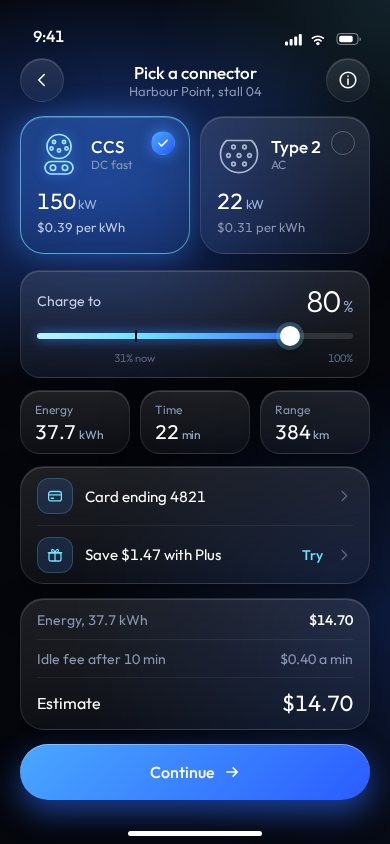
A checkout screen from Volta, an EV charging app template in a Glass style. Screen 11 of 25.
Volta is a complete EV charging app: welcome, sign in, a code and adding your car, a home with the live charge, a charger map with filters, nearby stations, a station with its stalls, picking a connector, plugging in, a live session, the finished charge and its receipt, a trip planner with charging stops, car status, a home charging schedule, energy stats, history, wallet, a Plus plan, notifications, profile and settings. One electric blue for everything that carries current.
| Detail | Value |
|---|---|
| Screen type | Checkout |
| App | Volta: EV charging |
| Category | Travel |
| Design language | Glass, dark |
| Type | Outfit |
| Colours | #05070d background, #111624 surface, #ffffff text, #8b97b3 text-muted, #3d8bff accent, #ffffff accent-contrast, #6fe3ff secondary, #232a3c border, #ff5f6e danger |
What this screen says
- Pick a connectorHarbour Point, stall 04
- CCSDC fast
- 150kW
- $0.39 per kWh
- Type 2AC
- 22kW
- $0.31 per kWh
- Charge to80%
- 31% now 100%
- Energy
- 37.7kWh
- Time
- 22min
- Range
- 384km
- Card ending 4821
- Save $1.47 with Plus
- Try
- Energy, 37.7 kWh$14.70
- Idle fee after 10 min$0.40 a min
- Estimate$14.70
- Continue
Around it in Volta
More booking and checkout screens
- Roamly Dates and guests: Trips, stays and experiences
- Jaunt Checkout: Bus, train and flight booking
- Spoke Reserve: Bike sharing
- Navara Booking: Yacht charter
- Voya Seats: Travel booking
- Wheelhouse Cash out: Driver app for ride hailing
- Fuelup Confirm: Pay at the pump and car wash
- Omnia Choose ride: Super app for rides, food and payments
- Staya Confirm and pay: Homes and stays from local hosts
- Lodge Payment: Hotels, deals and reservations
- Fare options: Flight search and price alerts
- Rove Pick a date: Reviews and things to do
Every travel app checkout screen
What makes a good checkout screen
- Show the total early and honestly. Taxes, delivery and service fees should appear before the last step. A higher total on the final screen feels like a trick.
- Offer wallet payments. Apple Pay and Google Pay skip card typing entirely. Show them first when they are available.
- Ask for the minimum. Only the fields needed to deliver or book. Save details for next time.
- Let people review before paying. A clear summary of items, dates, address and price, with each part editable without starting over.
The full checkout screen guide and every example
Remix Volta free: describe your own app and it is drawn in this design. Or get its files from $10: Figma, React Native, SwiftUI, Flutter and HTML.