Templates · List and feed screens · Lifestyle app · Vetly
Vetly Notifications screen
A list screen from Vetly, a pet health record app template in a Neubrutalism style. Screen 22 of 25.
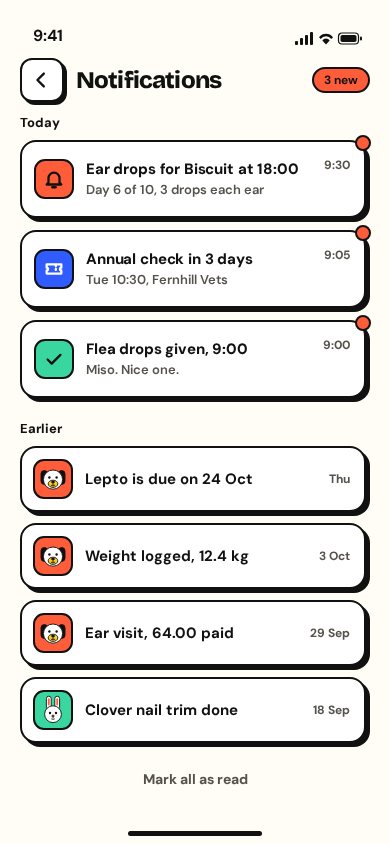
Vetly is a complete pet health app: welcome, sign in, adding a pet, a home with the next visit and today's meds, a book for each pet, a stamped vaccination card, vet visits as notched tickets with booking, medication reminders, a weight chart and log, a food log, nearby vets, a Plus plan, notifications, profile and settings. Every pet, stamp and pictogram is drawn.
| Detail | Value |
|---|---|
| Screen type | List |
| App | Vetly: Pet health record |
| Category | Lifestyle |
| Design language | Neubrutalism, light |
| Type | DM Sans |
| Colours | #fffdf5 background, #ffffff surface, #111111 text, #55524b text-muted, #ff5c39 accent, #111111 accent-contrast, #2f5bff secondary, #111111 border, #d63a1a danger |
What this screen says
- Notifications
- 3 new
- Today
- Ear drops for Biscuit at 18:00
- Day 6 of 10, 3 drops each ear
- Annual check in 3 days
- Tue 10:30, Fernhill Vets
- Flea drops given, 9:00
- Miso. Nice one.
- Earlier
- Lepto is due on 24 Oct
- Thu
- Weight logged, 12.4 kg
- 3 Oct
- Ear visit, 64.00 paid
- 29 Sep
- Clover nail trim done
- 18 Sep
- Mark all as read
Around it in Vetly
More list and feed screens
- Drape Swap item: AI wardrobe and daily outfits
- Mane Saved looks: AI hairstyle try-on
- Annex Results: AI interior redesign
- Kino Episodes: Film and series streaming
- Waybill Archive: Every parcel, read like its label
- Torque Service: The workshop manual for your own car
- Stitch Projects: A knitting companion drawn as one big knitting chart
- Roost Shopping list: Your shared house, stuck to the fridge door
- Trellis Beds: Vegetable garden planner
- Grain Album: Camera and photo editor
- Posy Shop: Flower delivery and weekly stems
- Fern Reminders: Plant care
Every lifestyle app list screen
What makes a good list screen
- Show what people need to decide. Each row should carry just enough to choose: a title, one or two details and a status. Everything else belongs on the detail screen.
- Keep rows consistent. The same information in the same place on every row lets people scan down a column instead of reading each item.
- Group with headings. Dates, categories or status headings break long lists into chunks people can skip through.
- Make common actions quick. Swipe actions, a checkbox or a heart on the row save opening the item for small tasks.
The full list screen guide and every example
Remix Vetly free: describe your own app and it is drawn in this design. Or get its files from $10: Figma, React Native, SwiftUI, Flutter and HTML.