Templates · List and feed screens · Lifestyle app · Drape
Drape Swap item screen
A list screen from Drape, an AI wardrobe and daily outfits app template in a Minimal style. Screen 7 of 25.
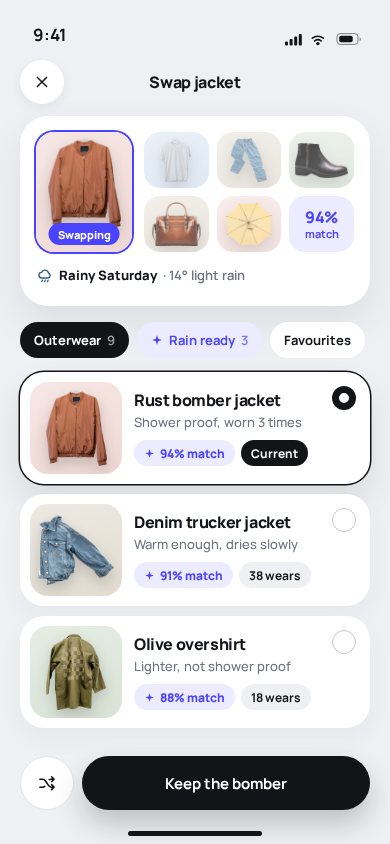
Drape is a complete AI wardrobe app: a style quiz, sizes and sign in, an outfit of the day built for the weather and the calendar, piece by piece swaps, a wardrobe grid by category, item pages with wears and cost per wear, a camera that detects and tags a garment, saved outfits and a builder, a week planner, trip packing, occasion picks, a stylist chat, stats, declutter, shopping gaps, inspiration, a paywall, profile and settings. Pale grey and white with ink and electric indigo, garments as true cut-outs on tinted tiles.
| Detail | Value |
|---|---|
| Screen type | List |
| App | Drape: AI wardrobe and daily outfits |
| Category | Lifestyle |
| Design language | Minimal, light |
| Type | Manrope |
| Colours | #eef0f3 background, #ffffff surface, #121417 text, #6b7280 text-muted, #4a43ff accent, #ffffff accent-contrast, #dbe6f2 secondary, #e1e4ea border, #d9483b danger |
What this screen says
- Swap jacket
- Swapping
- 94%match
- Rainy Saturday · 14° light rain
- Outerwear 9
- Rain ready 3
- Favourites
- Rust bomber jacketShower proof, worn 3 times
- 94% match
- Current
- Denim trucker jacketWarm enough, dries slowly
- 91% match
- 38 wears
- Olive overshirtLighter, not shower proof
- 88% match
- 18 wears
- Keep the bomber
Around it in Drape
More list and feed screens
- Sable New in: Fashion store
- Bazaar Chats: Local buy and sell
- Kiln Results: Handmade marketplace
- Mane Saved looks: AI hairstyle try-on
- Annex Results: AI interior redesign
- Kino Episodes: Film and series streaming
- Waybill Archive: Every parcel, read like its label
- Torque Service: The workshop manual for your own car
- Vetly Pets: Pet health record
- Stitch Projects: A knitting companion drawn as one big knitting chart
- Roost Shopping list: Your shared house, stuck to the fridge door
- Trellis Beds: Vegetable garden planner
Every lifestyle app list screen
What makes a good list screen
- Show what people need to decide. Each row should carry just enough to choose: a title, one or two details and a status. Everything else belongs on the detail screen.
- Keep rows consistent. The same information in the same place on every row lets people scan down a column instead of reading each item.
- Group with headings. Dates, categories or status headings break long lists into chunks people can skip through.
- Make common actions quick. Swipe actions, a checkbox or a heart on the row save opening the item for small tasks.
The full list screen guide and every example
Remix Drape free: describe your own app and it is drawn in this design. Or get its files from $10: Figma, React Native, SwiftUI, Flutter and HTML.