Templates · List and feed screens · Fitness app · Velo
Velo Instructors screen
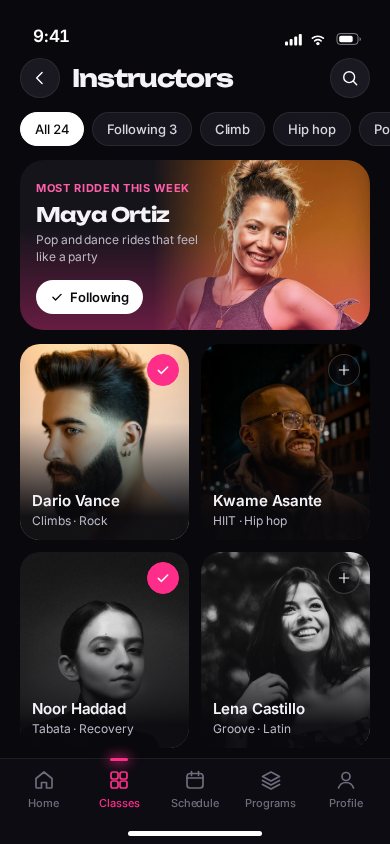
A list screen from Velo, a live and on-demand indoor cycling app template in a Dark-first style. Screen 15 of 25.
Velo is a complete indoor cycling app: welcome, goals and sign in, a home with your streak, the next live ride and your stack, a class library with filters, class details with the playlist and effort profile, the live schedule, booking and a confirmation, a countdown, the ride itself with three live metrics and a leaderboard, a summary with an output graph, instructors, programs, a stack, progress, achievements, membership, notifications, profile and settings. Stage black with hot magenta, cyan and amber.
| Detail | Value |
|---|---|
| Screen type | List |
| App | Velo: Live and on-demand indoor cycling |
| Category | Health and fitness |
| Design language | Dark-first, dark |
| Type | Unbounded for headings, Inter for text |
| Colours | #09090d background, #15141b surface, #f5f3f8 text, #8e8b9b text-muted, #ff2d8a accent, #ffffff accent-contrast, #36e3ff secondary, #26242f border, #ffb23e warning |
What this screen says
- Instructors
- All 24 Following 3 Climb Hip hop Pop
- MOST RIDDEN THIS WEEK
- Maya Ortiz
- Pop and dance rides that feel like a party
- Following
- Dario Vance
- Climbs · Rock
- Kwame Asante
- HIIT · Hip hop
- Noor Haddad
- Tabata · Recovery
- Lena Castillo
- Groove · Latin
- Home
- Classes
- Schedule
- Programs
- Profile
Around it in Velo
More list and feed screens
- Clinic Reviews: Find and book doctors
- Careline Calendar: Care for an ageing parent
- Vantage Activities: Sports watch companion
- Labwork Results: Book blood tests and see results
- Segment Comments: Runs and rides with friends
- Nightly Journal: Smart ring sleep and readiness
- Pillbox Medicines: Pharmacy refills and medicine reminders
- Rise Alarms: Alarm clock and sleep cycles
- Ward Visits: Patient portal for results, visits and messages
- Level Logbook: Glucose monitor companion
- Reformer Schedule: Pilates studio booking
- Sip History: Water intake and hydration
What makes a good list screen
- Show what people need to decide. Each row should carry just enough to choose: a title, one or two details and a status. Everything else belongs on the detail screen.
- Keep rows consistent. The same information in the same place on every row lets people scan down a column instead of reading each item.
- Group with headings. Dates, categories or status headings break long lists into chunks people can skip through.
- Make common actions quick. Swipe actions, a checkbox or a heart on the row save opening the item for small tasks.
The full list screen guide and every example
Remix Velo free: describe your own app and it is drawn in this design. Or get its files from $10: Figma, React Native, SwiftUI, Flutter and HTML.