Templates · List and feed screens · Fitness app · Vantage
Vantage Activities screen
A list screen from Vantage, a sports watch companion app template in a Clinical style. Screen 12 of 25.
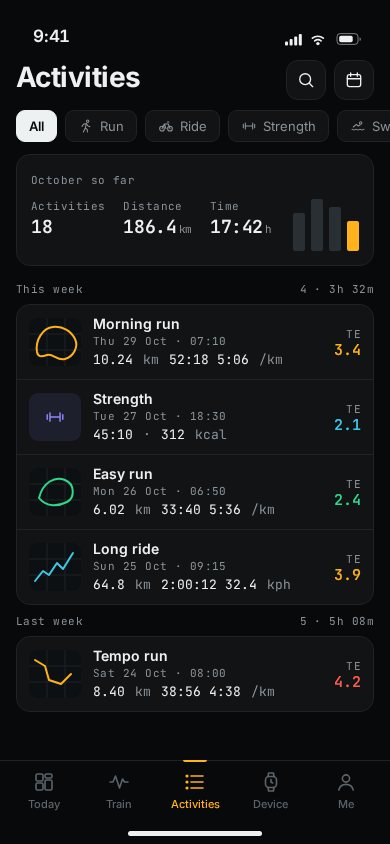
Vantage is a complete sports watch companion: welcome, sign in and watch pairing, a customisable my day of cards, sleep score with stages, an energy reserve curve, heart rate, HRV status, training readiness and training load, activity history with a run on a map, splits and heart rate zones, suggested workouts with a structured interval plan scheduled and synced to the watch, device status, watch faces with complications, badges and challenges, notifications, a Pro plan, profile and settings. True black and charcoal with signal amber, cyan, mint and coral.
| Detail | Value |
|---|---|
| Screen type | List |
| App | Vantage: Sports watch companion |
| Category | Health and fitness |
| Design language | Clinical, dark |
| Type | JetBrains Mono for headings, Inter for text |
| Colours | #08090a background, #111315 surface, #eef1f2 text, #8a9399 text-muted, #ffb21a accent, #140d00 accent-contrast, #3cc8e8 secondary, #1f2327 border, #ff5c4d danger |
What this screen says
- Activities
- All Run Ride Strength Swim
- October so far
- Activities 18
- Distance 186.4km
- Time 17:42h
- This week 4 · 3h 32m
- Morning runThu 29 Oct · 07:10
- 10.24km 52:18 5:06/km
- TE 3.4
- StrengthTue 27 Oct · 18:30
- 45:10 · 312kcal
- TE 2.1
- Easy runMon 26 Oct · 06:50
- 6.02km 33:40 5:36/km
- TE 2.4
- Long rideSun 25 Oct · 09:15
- 64.8km 2:00:12 32.4kph
- TE 3.9
- Last week 5 · 5h 08m
- Tempo runSat 24 Oct · 08:00
- 8.40km 38:56 4:38/km
- TE 4.2
- Today
- Train
- Device
- Me
Around it in Vantage
More list and feed screens
- Unfold Notifications: Yoga and stretching
- Kilo History: Strength training log
- Cyra Calendar: Cycle tracker
- Harbor Journal: Therapy and mood
- Fasten Plans: Intermittent fasting
- Plate Diary: Calorie and macro tracker
- Vita Lab tests: Personal health record
- Forge Notifications: AI fitness and nutrition
- Lull Notifications: Sleep sounds and meditation
- Pace Workouts: Fitness tracker
- Flexpass Upcoming: One membership, many studios
- Clinic Reviews: Find and book doctors
What makes a good list screen
- Show what people need to decide. Each row should carry just enough to choose: a title, one or two details and a status. Everything else belongs on the detail screen.
- Keep rows consistent. The same information in the same place on every row lets people scan down a column instead of reading each item.
- Group with headings. Dates, categories or status headings break long lists into chunks people can skip through.
- Make common actions quick. Swipe actions, a checkbox or a heart on the row save opening the item for small tasks.
The full list screen guide and every example
Remix Vantage free: describe your own app and it is drawn in this design. Or get its files from $10: Figma, React Native, SwiftUI, Flutter and HTML.