Templates · List and feed screens · Education app · Tuckin
Tuckin Collection screen
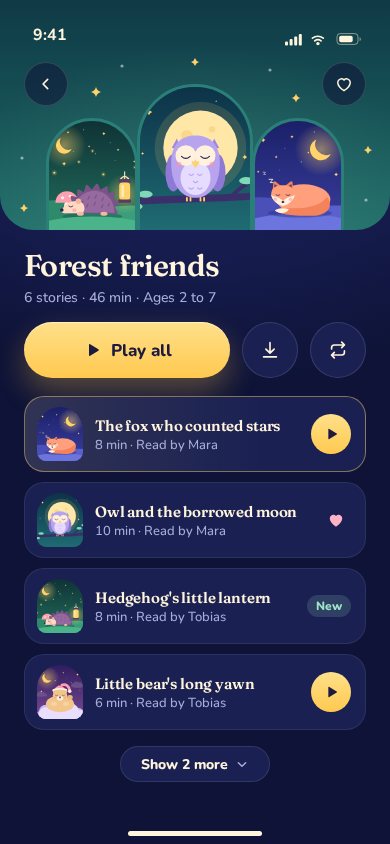
A list screen from Tuckin, a bedtime stories for kids app template in a Playful style. Screen 11 of 25.
Tuckin is a complete bedtime story app: welcome, sign in, adding a child and a bedtime, picking who is listening, a home with tonight's story, a library, search and collections, a story page, an illustrated reader, a narration player with a sleep timer, sleep sounds, a goodnight screen, favourites, a bedtime diary, child and family profiles, a parent gate, parent controls, a Plus plan and settings. Everything a child can tap is star yellow; everything for parents is calm and plain.
| Detail | Value |
|---|---|
| Screen type | List |
| App | Tuckin: Bedtime stories for kids |
| Category | Education |
| Design language | Playful, dark |
| Type | Nunito |
| Colours | #0e1337 background, #1a2152 surface, #fff4dc text, #a6add8 text-muted, #ffd36a accent, #1c1a3f accent-contrast, #ffb199 secondary, #2b3370 border, #ff8a94 danger |
What this screen says
- Forest friends
- 6 stories · 46 min · Ages 2 to 7
- Play all
- The fox who counted stars
- 8 min · Read by Mara
- Owl and the borrowed moon
- 10 min · Read by Mara
- Hedgehog's little lantern
- 8 min · Read by Tobias
- New
- Little bear's long yawn
- 6 min · Read by Tobias
- Show 2 more
Around it in Tuckin
More list and feed screens
- Wren Phonics: Early reading for kids
- Proof Practice: Maths tutor that shows its working
- Skim Library: Speed reading trainer
- Terra Europe: Geography and flags quiz
- Gambit Lessons: Chess training
- Buzzer Podium: Live trivia
- Homeroom Homework: School, all on one page
- Parla Review: Language learning
- Recall Notifications: Flashcards and spaced repetition
- Numo World map: Kids maths game
- Syntax Notifications: Learn to code
- Zenith Planets: Night sky guide
Every education app list screen
What makes a good list screen
- Show what people need to decide. Each row should carry just enough to choose: a title, one or two details and a status. Everything else belongs on the detail screen.
- Keep rows consistent. The same information in the same place on every row lets people scan down a column instead of reading each item.
- Group with headings. Dates, categories or status headings break long lists into chunks people can skip through.
- Make common actions quick. Swipe actions, a checkbox or a heart on the row save opening the item for small tasks.
The full list screen guide and every example
Remix Tuckin free: describe your own app and it is drawn in this design. Or get its files from $10: Figma, React Native, SwiftUI, Flutter and HTML.