Templates · List and feed screens · Lifestyle app · Trellis
Trellis Harvest log screen
A list screen from Trellis, a vegetable garden planner app template in a Minimal style. Screen 16 of 25.
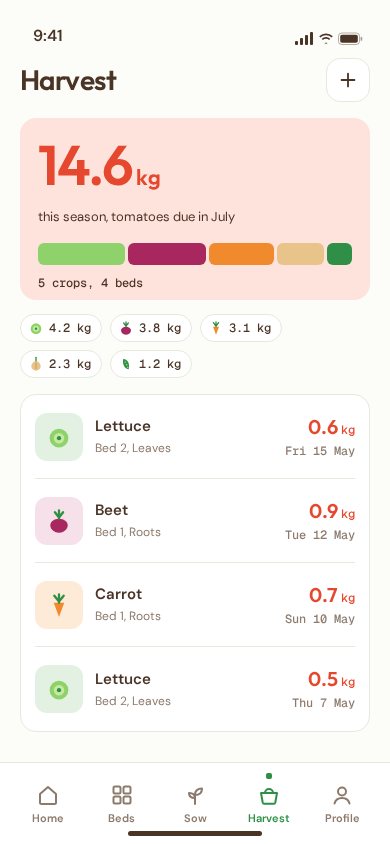
Trellis is trellis plans a vegetable plot square by square. It covers laying out beds, what to sow this week, a sowing calendar, watering and rain, the harvest log with weights, crop rotation across four bed groups and the season between frost dates.
| Detail | Value |
|---|---|
| Screen type | List |
| App | Trellis: Vegetable garden planner |
| Category | Lifestyle |
| Design language | Minimal, light |
| Type | DM Sans |
| Colours | #fcfdf9 background, #ffffff surface, #4a3426 text, #8c7a6c text-muted, #2f8f46 accent, #ffffff accent-contrast, #f6c945 secondary, #e6eadc border, #e5482f danger |
What this screen says
- Harvest
- 14.6kg
- this season, tomatoes due in July
- 5 crops, 4 beds
- 4.2 kg 3.8 kg 3.1 kg 2.3 kg 1.2 kg
- LettuceBed 2, Leaves
- 0.6kgFri 15 May
- BeetBed 1, Roots
- 0.9kgTue 12 May
- CarrotBed 1, Roots
- 0.7kgSun 10 May
- 0.5kgThu 7 May
- Home
- Beds
- Sow
- Profile
Around it in Trellis
More list and feed screens
- Provenance Results: Authenticated luxury resale
- Gavel Auctions: Live online auctions
- Tidy Choose cleaner: Book home cleaners
- Dorm Saved: Find student housing
- Hem Orders: Tailoring and alterations, collected
- Lendly Party gear: Borrow things from neighbours
- Stub Listings: Fan to fan ticket resale
- Trove Boards: Visual ideas and boards
- Vidi Comments: Video platform for creators
- Roll Albums: Photo library and backups
- Splice Add media: Video editor for short clips
- Blush Lipstick: Beauty and makeup shopping
Every lifestyle app list screen
What makes a good list screen
- Show what people need to decide. Each row should carry just enough to choose: a title, one or two details and a status. Everything else belongs on the detail screen.
- Keep rows consistent. The same information in the same place on every row lets people scan down a column instead of reading each item.
- Group with headings. Dates, categories or status headings break long lists into chunks people can skip through.
- Make common actions quick. Swipe actions, a checkbox or a heart on the row save opening the item for small tasks.
The full list screen guide and every example
Remix Trellis free: describe your own app and it is drawn in this design. Or get its files from $10: Figma, React Native, SwiftUI, Flutter and HTML.