Templates · Form and input screens · Lifestyle app · Tower
Tower eSIM setup screen
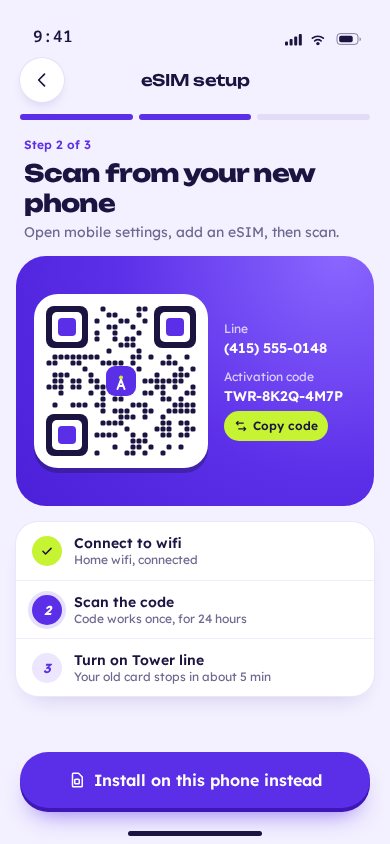
A form screen from Tower, a lifestyle app template in a Playful style. Screen 18 of 25.
Tower is a complete mobile carrier app: welcome, sign in with a phone number and a one time code, a home with the data ring for this cycle, minutes, texts and hotspot, usage by day and by app, plan details, plans to switch to, data top ups with checkout and a success screen, bills with a line by line breakdown and pay bill, roaming with a travel pass, family lines with limits, eSIM setup with a QR code, a phone shop with a phone page, live network status on a map, a support chat, notifications, account and settings. Lilac and white with signal violet, electric lime and a pop of pink.
| Detail | Value |
|---|---|
| Screen type | Form |
| App | Tower: Mobile plan, data and bills |
| Category | Lifestyle |
| Design language | Playful, light |
| Type | Unbounded for headings, Lexend for text |
| Colours | #f3f0ff background, #ffffff surface, #1b1340 text, #6e6890 text-muted, #5b2ee8 accent, #ffffff accent-contrast, #c6f432 secondary, #e6e0fa border, #ff4f6d danger |
What this screen says
- eSIM setup
- Step 2 of 3
- Scan from your new phone
- Open mobile settings, add an eSIM, then scan.
- Line(415) 555-0148
- Activation codeTWR-8K2Q-4M7P Copy code
- Connect to wifiHome wifi, connected
- Scan the codeCode works once, for 24 hours
- Turn on Tower lineYour old card stops in about 5 min
- Install on this phone instead
Around it in Tower
More form and input screens
- Laced Release alert: Sneaker drops and raffles
- Gloss Write a review: Salon and spa booking
- Vow Add expense: Wedding planner
- Drizzle Edit widget: Weather with living skies
- Shelf Log progress: Reading tracker and book club
- Marquee Write a review: Cinema tickets and watchlist
- Handy Address: Home services
- Tasker Task details: Book and do local odd jobs
- Toolbox Calculator: Hardware store and project lists
- Brief Poll: News in sixty words
- Kibble Edit autoship: Pet supplies and autoship
- Filmlog Log film: Film diary and reviews
Every lifestyle app form screen
What makes a good form screen
- Ask only what you need. Every field is a reason to stop. Remove optional fields or move them to later.
- Labels above fields. Visible labels stay readable while people type; placeholder-only labels disappear.
- Use the right keyboard and input. Number pads for amounts, email keyboards for email, pickers for dates and autofill for addresses and codes.
- Validate as people go. Show problems next to the field when people leave it, in words that say how to fix them.
The full form screen guide and every example
Remix Tower free: describe your own app and it is drawn in this design. Or get its files from $10: Figma, React Native, SwiftUI, Flutter and HTML.