Templates · List and feed screens · Lifestyle app · Torque
Torque Parts screen
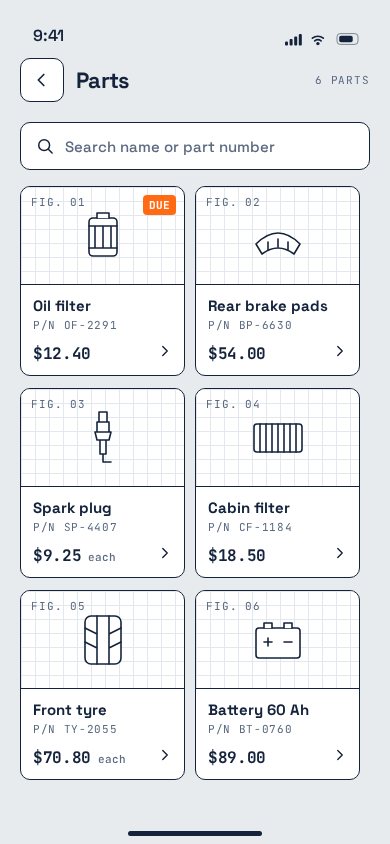
A list screen from Torque, a lifestyle app template in an Enterprise style. Screen 12 of 25.
Torque is torque keeps one car's service history, mileage based reminders, parts, fuel fill ups and running costs. It also books a garage slot and explains every dashboard warning light.
| Detail | Value |
|---|---|
| Screen type | List |
| App | Torque: The workshop manual for your own car |
| Category | Lifestyle |
| Design language | Enterprise, light |
| Type | Space Grotesk |
| Colours | #e8ebee background, #ffffff surface, #14233b text, #5b6a80 text-muted, #ff6a13 accent, #ffffff accent-contrast, #22375a secondary, #c9d0d8 border, #d92d20 danger |
What this screen says
- Parts
- 6 PARTS
- Search name or part number
- FIG. 01 DUE
- Oil filter
- P/N OF-2291
- FIG. 02
- Rear brake pads
- P/N BP-6630
- FIG. 03
- Spark plug
- P/N SP-4407
- $9.25 each
- FIG. 04
- Cabin filter
- P/N CF-1184
- FIG. 05
- Front tyre
- P/N TY-2055
- $70.80 each
- FIG. 06
- Battery 60 Ah
- P/N BT-0760
Around it in Torque
More list and feed screens
- Laced Calendar: Sneaker drops and raffles
- Gloss Salons: Salon and spa booking
- Vow Notifications: Wedding planner
- Drizzle 10 day: Weather with living skies
- Byline Sections: Daily news reader
- Shelf Notifications: Reading tracker and book club
- Marquee Reviews: Cinema tickets and watchlist
- Handy Choose a pro: Home services
- Tasker Choose tasker: Book and do local odd jobs
- Toolbox Questions: Hardware store and project lists
- Brief Morning brief: News in sixty words
- Kibble Reviews: Pet supplies and autoship
Every lifestyle app list screen
What makes a good list screen
- Show what people need to decide. Each row should carry just enough to choose: a title, one or two details and a status. Everything else belongs on the detail screen.
- Keep rows consistent. The same information in the same place on every row lets people scan down a column instead of reading each item.
- Group with headings. Dates, categories or status headings break long lists into chunks people can skip through.
- Make common actions quick. Swipe actions, a checkbox or a heart on the row save opening the item for small tasks.
The full list screen guide and every example
Remix Torque free: describe your own app and it is drawn in this design. Or get its files from $10: Figma, React Native, SwiftUI, Flutter and HTML.