Templates · Dashboard and stats screens · Lifestyle app · Torque
Torque Costs screen
A dashboard screen from Torque, a lifestyle app template in an Enterprise style. Screen 16 of 25.
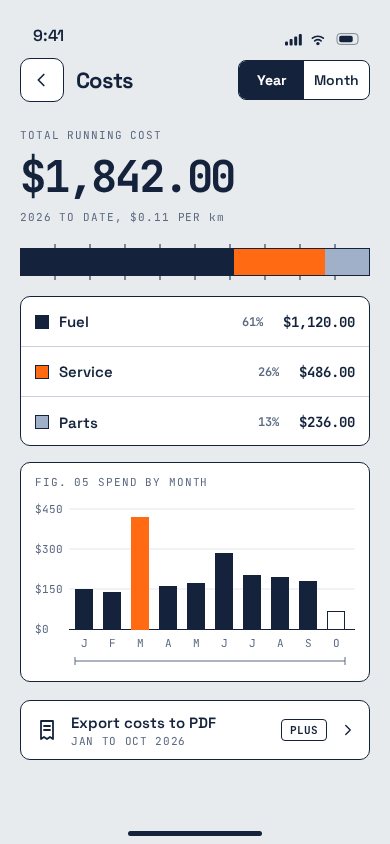
Torque is torque keeps one car's service history, mileage based reminders, parts, fuel fill ups and running costs. It also books a garage slot and explains every dashboard warning light.
| Detail | Value |
|---|---|
| Screen type | Dashboard |
| App | Torque: The workshop manual for your own car |
| Category | Lifestyle |
| Design language | Enterprise, light |
| Type | Space Grotesk |
| Colours | #e8ebee background, #ffffff surface, #14233b text, #5b6a80 text-muted, #ff6a13 accent, #ffffff accent-contrast, #22375a secondary, #c9d0d8 border, #d92d20 danger |
What this screen says
- Costs
- Year
- Month
- TOTAL RUNNING COST $1,842.002026 TO DATE, $0.11 PER km
- Fuel 61%$1,120.00
- Service 26%$486.00
- Parts 13%$236.00
- FIG. 05 SPEND BY MONTH
- Export costs to PDF
- JAN TO OCT 2026
- PLUS
Around it in Torque
More dashboard and stats screens
- Grain Stats: Camera and photo editor
- Posy Deliveries: Flower delivery and weekly stems
- Fern Insights: Plant care
- Doorstep Area: Homes for sale and rent
- Rewear Earnings: Secondhand fashion marketplace
- Laced Resale value: Sneaker drops and raffles
- Gloss Rewards: Salon and spa booking
- Vow Budget: Wedding planner
- Drizzle Rain: Weather with living skies
- Byline Reading stats: Daily news reader
- Shelf Reading goal: Reading tracker and book club
- Marquee Year in film: Cinema tickets and watchlist
Every lifestyle app dashboard screen
What makes a good dashboard screen
- One headline number. The figure that matters most, like balance, steps or revenue, large at the top with its change since the last period.
- Give numbers context. Compared with last week, against a goal or as a trend line. A number alone does not say if it is good.
- Pick simple charts. Bars for comparing periods, lines for trends and rings for progress toward a goal. Avoid charts that need a legend to read.
- Let people change the period. Day, week, month and year as a segmented control above the chart.
The full dashboard screen guide and every example
Remix Torque free: describe your own app and it is drawn in this design. Or get its files from $10: Figma, React Native, SwiftUI, Flutter and HTML.