Templates · Paywall screens · Lifestyle app · Toolbox
Toolbox Pro screen
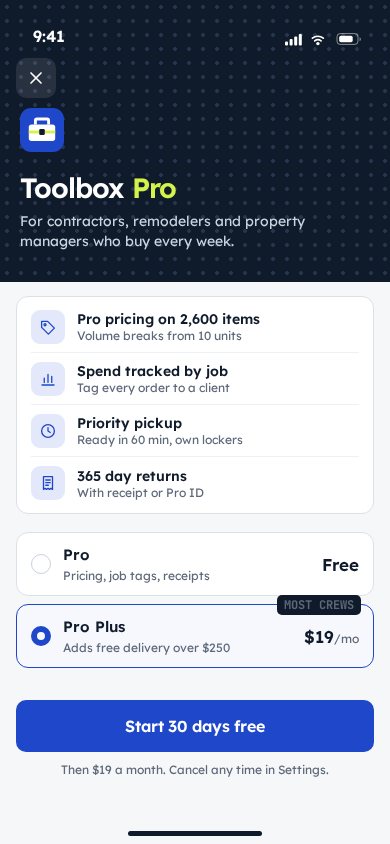
A paywall screen from Toolbox, a hardware store and project lists app template in an Enterprise style. Screen 21 of 25.
Toolbox is a complete hardware store app: welcome, choosing a home store, sign in, a home with a ready pickup, the active project and departments, search with aisle, bay and stock on every result, a product page with specs and questions, a store floor plan with a walking route, a barcode scanner, project lists sorted by aisle with a decking calculator, a cart split into pickup and delivery, checkout, order placed, orders and a pickup locker, tool rental with a reservation, a Pro plan with job spend, notifications, profile and settings. Cool grey and white with ink, cobalt and a lime signal.
| Detail | Value |
|---|---|
| Screen type | Paywall |
| App | Toolbox: Hardware store and project lists |
| Category | Lifestyle |
| Design language | Enterprise, light |
| Type | Lexend |
| Colours | #eef1f4 background, #ffffff surface, #0f1a2a text, #5d6878 text-muted, #1f47c9 accent, #ffffff accent-contrast, #d4f34a secondary, #dce1e8 border, #cf3a3a danger |
What this screen says
- Toolbox Pro
- For contractors, remodelers and property managers who buy every week.
- Pro pricing on 2,600 itemsVolume breaks from 10 units
- Spend tracked by jobTag every order to a client
- Priority pickupReady in 60 min, own lockers
- 365 day returnsWith receipt or Pro ID
- ProPricing, job tags, receipts
- Free
- MOST CREWS
- Pro PlusAdds free delivery over $250
- $19/mo
- Start 30 days free
- Then $19 a month. Cancel any time in Settings.
Around it in Toolbox
More paywall screens
- Trove Plus: Visual ideas and boards
- Vidi Plus: Video platform for creators
- Roll Plus: Photo library and backups
- Splice Pro: Video editor for short clips
- Blush Plus: Beauty and makeup shopping
- Flatpack Plus: Furniture store with room previews
- Column Subscribe: Newsletters and independent writers
- Fetch Plus: Dog walkers and pet sitters
- Forecourt Cover: Buy and sell used cars
- Tower Plans: Mobile plan, data and bills
- Haul Club: Bargain fashion and finds
- Muse Plans: AI image studio
Every lifestyle app paywall screen
What makes a good paywall screen
- Lead with the outcome, not the feature list. The headline should say what changes for the person: "Train smarter every week" beats "Unlock Premium". Three to five benefits underneath are enough; more turns into a wall of ticks nobody reads.
- Show the real price, period and trial terms. State the price, how often it renews and when a free trial turns into a charge, near the button. Apple's App Store guideline 3.1.2 asks subscription apps to make this clear before purchase, and Google Play has similar rules.
- One primary button. The main call to action should be impossible to miss and say what happens: "Start 7-day free trial" or "Subscribe for $4.99/month". A second plan choice is fine; a second competing button is not.
- Make the plans easy to compare. When you offer monthly and yearly, show both prices in the same unit (per month or per week) and mark the saving on the yearly plan in plain numbers, not just a badge.
The full paywall screen guide and every example
Remix Toolbox free: describe your own app and it is drawn in this design. Or get its files from $10: Figma, React Native, SwiftUI, Flutter and HTML.