Templates · Paywall screens · Lifestyle app · Roll
Roll Plus screen
A paywall screen from Roll, a photo library and backups app template in a Minimal style. Screen 22 of 25.
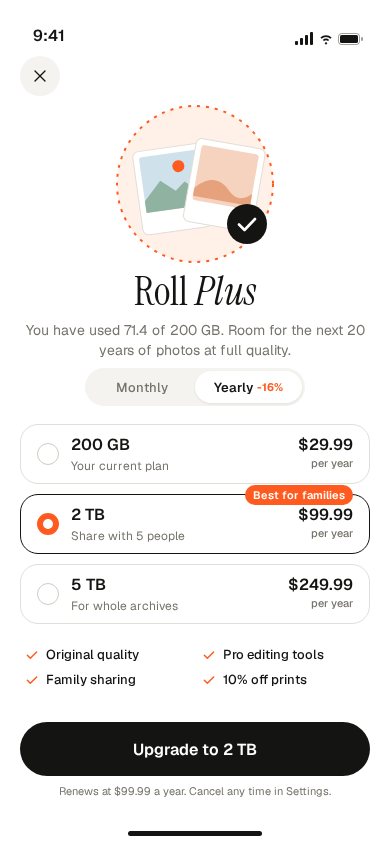
Roll is a complete photo library app: welcome, choosing what to back up, sign in, a library grid grouped by day, a photo viewer with its details, an editor, search by people, places and things, results, a person's photos, albums and an album, a memory story, a new album, sharing a link, shared albums and a partner library, live backup progress, storage and a clean up review, ordering prints with confirmation, a storage plan, activity, account and settings. White and warm grey with near black ink and a persimmon accent.
| Detail | Value |
|---|---|
| Screen type | Paywall |
| App | Roll: Photo library and backups |
| Category | Lifestyle |
| Design language | Minimal, light |
| Type | Instrument Serif for headings, Geist for text |
| Colours | #ffffff background, #f4f3ef surface, #141413 text, #76736b text-muted, #ff5a1f accent, #fff0e8 accent-soft, #e9e7e1 border, #1f9d5c success, #e5383b danger |
What this screen says
- Roll Plus
- You have used 71.4 of 200 GB. Room for the next 20 years of photos at full quality.
- Monthly Yearly -16%
- 200 GBYour current plan
- $29.99per year
- Best for families
- 2 TBShare with 5 people
- $99.99per year
- 5 TBFor whole archives
- $249.99per year
- Original quality Pro editing tools Family sharing 10% off prints
- Upgrade to 2 TB
- Renews at $99.99 a year. Cancel any time in Settings.
Around it in Roll
More paywall screens
- Gavel Pass: Live online auctions
- Tidy Club: Book home cleaners
- Dorm Plus: Find student housing
- Hem Plus: Tailoring and alterations, collected
- Lendly Plus: Borrow things from neighbours
- Stub Plus: Fan to fan ticket resale
- Trove Plus: Visual ideas and boards
- Vidi Plus: Video platform for creators
- Splice Pro: Video editor for short clips
- Blush Plus: Beauty and makeup shopping
- Flatpack Plus: Furniture store with room previews
- Column Subscribe: Newsletters and independent writers
Every lifestyle app paywall screen
What makes a good paywall screen
- Lead with the outcome, not the feature list. The headline should say what changes for the person: "Train smarter every week" beats "Unlock Premium". Three to five benefits underneath are enough; more turns into a wall of ticks nobody reads.
- Show the real price, period and trial terms. State the price, how often it renews and when a free trial turns into a charge, near the button. Apple's App Store guideline 3.1.2 asks subscription apps to make this clear before purchase, and Google Play has similar rules.
- One primary button. The main call to action should be impossible to miss and say what happens: "Start 7-day free trial" or "Subscribe for $4.99/month". A second plan choice is fine; a second competing button is not.
- Make the plans easy to compare. When you offer monthly and yearly, show both prices in the same unit (per month or per week) and mark the saving on the yearly plan in plain numbers, not just a badge.
The full paywall screen guide and every example
Remix Roll free: describe your own app and it is drawn in this design. Or get its files from $10: Figma, React Native, SwiftUI, Flutter and HTML.