Templates · Dashboard and stats screens · Productivity app · Token
Token Activity screen
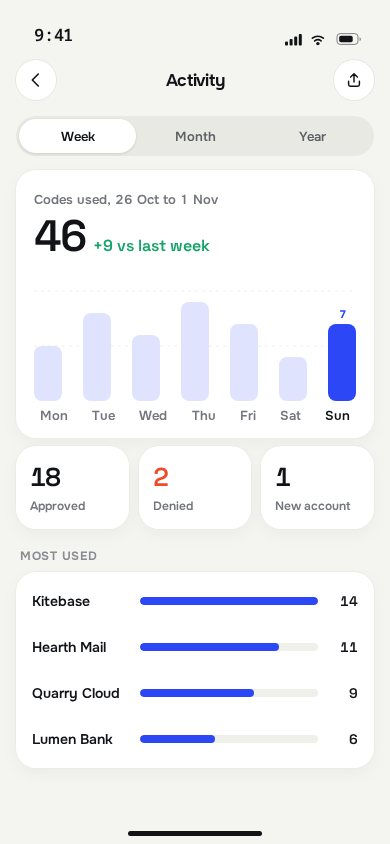
A dashboard screen from Token, a two-factor codes and sign-in approvals app template in a Minimal style. Screen 14 of 25.
Token is a complete authenticator: welcome, phone sign up and code check, app unlock, a codes home with a live 30 second countdown, an account with its big code, scanning a QR code, adding a key by hand and a ready screen, search, a sign-in request with a map and its approval, request history, weekly activity, devices, backups with a backup password and export, editing an account, groups, alerts, a Plus plan, profile and settings. Paper white and ink, cobalt for time and action, vermilion when a code is about to change.
| Detail | Value |
|---|---|
| Screen type | Dashboard |
| App | Token: Two-factor codes and sign-in approvals |
| Category | Productivity |
| Design language | Minimal, light |
| Type | Space Grotesk for headings, Onest for text |
| Colours | #f4f4f1 background, #ffffff surface, #111317 text, #74767d text-muted, #2c47f5 accent, #e9ecfe accent-tint, #e7e7e2 border, #ef4b2b danger, #13a36b success |
What this screen says
- Activity
- Week Month Year
- Codes used, 26 Oct to 1 Nov 46+9 vs last week
- Mon Tue Wed Thu Fri Sat Sun
- 18Approved
- 2Denied
- 1New account
- Most used
- Kitebase
- Hearth Mail
- Quarry Cloud
- Lumen Bank
Around it in Token
More dashboard and stats screens
- Pageview Acquisition: Website analytics
- Polish Score: Writing assistant and keyboard
- Tapline Tip jar: Link-in-bio pages and analytics
- Quill Analytics: Docs, wikis and databases in one workspace
- Tandem Analytics: Team chat, channels and huddles
- Shipyard Cycle: Issue tracking for product teams
- Canvas Insights: Design files and comments on mobile
- Merge Insights: Code, pull requests and reviews
- Query Market: AI answers with sources
- Glossa Insights: Translate text, voice and camera
- Layout Insights: Design anything from templates
- Tick Productivity: To-do lists and reminders
Every productivity app dashboard screen
What makes a good dashboard screen
- One headline number. The figure that matters most, like balance, steps or revenue, large at the top with its change since the last period.
- Give numbers context. Compared with last week, against a goal or as a trend line. A number alone does not say if it is good.
- Pick simple charts. Bars for comparing periods, lines for trends and rings for progress toward a goal. Avoid charts that need a legend to read.
- Let people change the period. Day, week, month and year as a segmented control above the chart.
The full dashboard screen guide and every example
Remix Token free: describe your own app and it is drawn in this design. Or get its files from $10: Figma, React Native, SwiftUI, Flutter and HTML.