Templates · List and feed screens · Social app · Tether
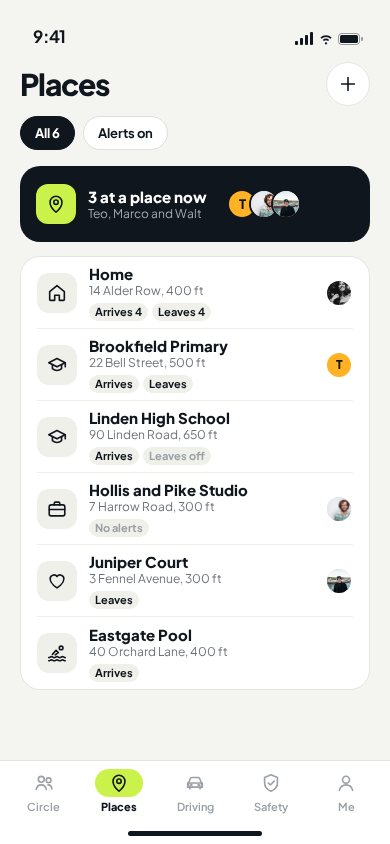
Tether Places screen
A list screen from Tether, a family location and safety app template in a Minimal style. Screen 8 of 25.
Tether is a complete family location and safety app: welcome, location access, sign in and joining a circle, a live circle map with everyone's place and battery, a member page, a day of location history, places with arrival and departure alerts, adding a place, weekly driving reports and a single drive, live walk home tracking, check in, an SOS with its confirmation, crash detection, emergency contacts, alerts, circle members, invites, a Plus plan with checkout, profile and settings. Paper and white with ink, hi-vis lime and a signal red.
| Detail | Value |
|---|---|
| Screen type | List |
| App | Tether: Family location and safety |
| Category | Social |
| Design language | Minimal, light |
| Type | Plus Jakarta Sans |
| Colours | #f4f4f0 background, #ffffff surface, #10161d text, #6d727a text-muted, #cbf24a accent, #10161d accent-contrast, #4f6b00 secondary, #e6e6df border, #ef4130 danger |
What this screen says
- Places
- All 6 Alerts on
- 3 at a place now
- Teo, Marco and Walt
- Home
- 14 Alder Row, 400 ft
- Arrives 4Leaves 4
- Brookfield Primary
- 22 Bell Street, 500 ft
- ArrivesLeaves
- Linden High School
- 90 Linden Road, 650 ft
- ArrivesLeaves off
- Hollis and Pike Studio
- 7 Harrow Road, 300 ft
- No alerts
- Juniper Court
- 3 Fennel Avenue, 300 ft
- Leaves
- Eastgate Pool
- 40 Orchard Lane, 400 ft
- Arrives
- Circle
- Driving
- Safety
- Me
Around it in Tether
More list and feed screens
- Civic My requests: Report issues and city services
- Guild Messages: Community servers with voice and text chat
- Parrot Calls: Private messaging, groups and calls
- Carrier Channels: Cloud messaging with channels
- Vista Comments: Photos, stories and reels
- Flick Following: Short video feed
- Squawk Topic: Short posts and live conversation
- Agora Comments: Communities, threads and votes
- Spark Likes: Swipe dating
- Candid Comments: One real photo a day
- Blink Chats: Camera chat and stories
- Cipher Note to self: Encrypted private messenger
What makes a good list screen
- Show what people need to decide. Each row should carry just enough to choose: a title, one or two details and a status. Everything else belongs on the detail screen.
- Keep rows consistent. The same information in the same place on every row lets people scan down a column instead of reading each item.
- Group with headings. Dates, categories or status headings break long lists into chunks people can skip through.
- Make common actions quick. Swipe actions, a checkbox or a heart on the row save opening the item for small tasks.
The full list screen guide and every example
Remix Tether free: describe your own app and it is drawn in this design. Or get its files from $10: Figma, React Native, SwiftUI, Flutter and HTML.