Templates · Form and input screens · Social app · Tether
Tether Invite screen
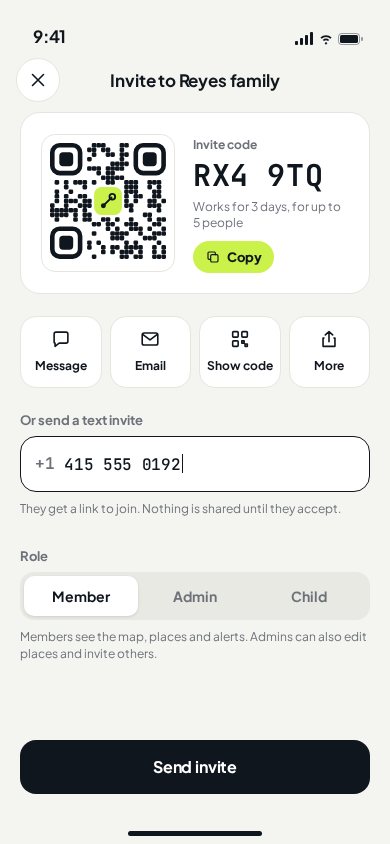
A form screen from Tether, a family location and safety app template in a Minimal style. Screen 21 of 25.
Tether is a complete family location and safety app: welcome, location access, sign in and joining a circle, a live circle map with everyone's place and battery, a member page, a day of location history, places with arrival and departure alerts, adding a place, weekly driving reports and a single drive, live walk home tracking, check in, an SOS with its confirmation, crash detection, emergency contacts, alerts, circle members, invites, a Plus plan with checkout, profile and settings. Paper and white with ink, hi-vis lime and a signal red.
| Detail | Value |
|---|---|
| Screen type | Form |
| App | Tether: Family location and safety |
| Category | Social |
| Design language | Minimal, light |
| Type | Plus Jakarta Sans |
| Colours | #f4f4f0 background, #ffffff surface, #10161d text, #6d727a text-muted, #cbf24a accent, #10161d accent-contrast, #4f6b00 secondary, #e6e6df border, #ef4130 danger |
What this screen says
- Invite to Reyes family
- Invite code
- RX4 9TQ
- Works for 3 days, for up to 5 people
- Copy
- Message
- Show code
- More
- Or send a text invite
- They get a link to join. Nothing is shared until they accept.
- Role
- MemberAdminChild
- Members see the map, places and alerts. Admins can also edit places and invite others.
- Send invite
Around it in Tether
More form and input screens
- Onair Go live: Live streaming
- Drift Start a room: Reels and voice rooms
- Glitz Go live: Party live streaming
- Hearth New circle: Messenger for trips and circles
- Chirp Your profile: Messenger with file sharing
- Banter Set up profile: Live messenger
- Natter New contact: Minimal messenger
- Nearly About you: Dating by crossed paths
- Linkup New post: Professional network and jobs
- Quorum Write answer: Questions and expert answers
- Backer New post: Support creators with memberships
- Pledge Add-ons: Back creative projects
What makes a good form screen
- Ask only what you need. Every field is a reason to stop. Remove optional fields or move them to later.
- Labels above fields. Visible labels stay readable while people type; placeholder-only labels disappear.
- Use the right keyboard and input. Number pads for amounts, email keyboards for email, pickers for dates and autofill for addresses and codes.
- Validate as people go. Show problems next to the field when people leave it, in words that say how to fix them.
The full form screen guide and every example
Remix Tether free: describe your own app and it is drawn in this design. Or get its files from $10: Figma, React Native, SwiftUI, Flutter and HTML.