Templates · Live tracking screens · Lifestyle app · Tasker
Tasker In progress screen
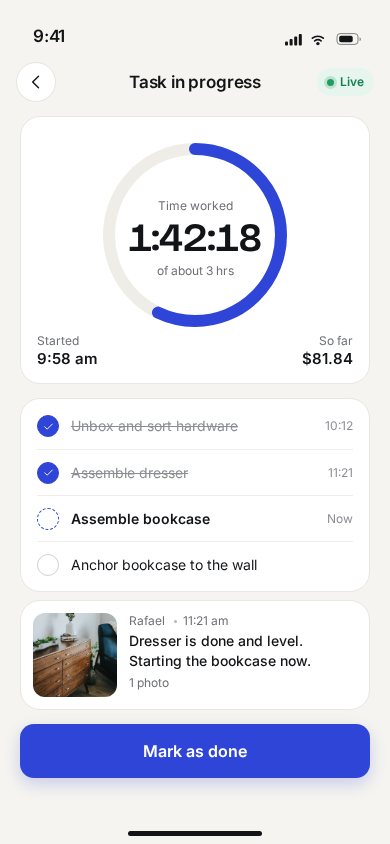
A tracking screen from Tasker, a lifestyle app template in a Minimal style. Screen 19 of 25.
Tasker is a complete local odd jobs app: welcome, sign in, a home with the next booked task and categories, search, a furniture assembly page, describing the task with size, items and photos, choosing a tasker by rate and reviews, filters, a tasker profile, reviews, a calendar with time slots, a confirm screen and a booked ticket, messages and a chat, my tasks, a task timeline, live arrival on a map, a running task timer, pay and tip, rating, a Plus membership, notifications, account and settings. Warm paper and white with ultramarine and lime.
| Detail | Value |
|---|---|
| Screen type | Tracking |
| App | Tasker: Book and do local odd jobs |
| Category | Lifestyle |
| Design language | Minimal, light |
| Type | Bricolage Grotesque for headings, Inter for text |
| Colours | #f5f4f0 background, #ffffff surface, #121417 text, #6c6f75 text-muted, #2f45d8 accent, #ffffff accent-contrast, #dff35f secondary, #e8e6e0 border, #d93f3f danger |
What this screen says
- Task in progress
- Live
- Time worked1:42:18of about 3 hrs
- Started9:58 am
- So far$81.84
- Unbox and sort hardware 10:12
- Assemble dresser 11:21
- Assemble bookcase Now
- Anchor bookcase to the wall
- Rafael 11:21 am
- Dresser is done and level. Starting the bookcase now.
- 1 photo
- Mark as done
Around it in Tasker
More live tracking screens
- Fetch Live walk: Dog walkers and pet sitters
- Forecourt Delivery: Buy and sell used cars
- Tower Network: Mobile plan, data and bills
- Haul Track order: Bargain fashion and finds
- Muse Generating: AI image studio
- Arcade Downloads: Game store, library and friends
- Natal Moon: Birth charts and daily astrology
- Sillage Wearing now: Fragrance wardrobe
- Hamper Delivery: Wishlists and gift registry
- Fade Queue: Barber booking
- Inked Aftercare: Tattoo artists and bookings
- Scrapbook Track order: Digital scrapbook journal
Every lifestyle app tracking screen
What makes a good live tracking screen
- The live number is the hero. Arrival time, pace, distance or time left, in large type at the top or centre.
- Show status in words. "Driver is 3 minutes away" or "Halfway there" alongside the map or chart.
- Make it readable while moving. Large numbers, high contrast and big buttons for pause, stop or call.
- Keep updates calm. Smooth movement on the map and steady numbers; jumpy updates feel broken.
The full live tracking screen guide and every example
Remix Tasker free: describe your own app and it is drawn in this design. Or get its files from $10: Figma, React Native, SwiftUI, Flutter and HTML.