Templates · List and feed screens · Finance app · Tally
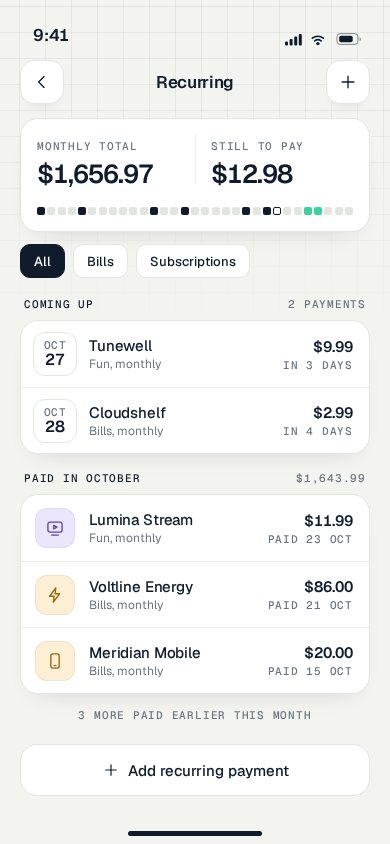
Tally Recurring screen
A list screen from Tally, a monthly budgeting app template in a Clinical style. Screen 15 of 25.
Tally is a complete budgeting app: welcome, sign in, passcode and budget setup, a home with what is left to spend, budgets by category with a donut, a category in detail, transactions and a single transaction, adding an expense on a keypad, recurring payments, savings goals, reports with bar charts, cash flow, linked accounts, a Plus plan, notifications, profile and settings. Every number is tabular and every category has its own colour and glyph.
| Detail | Value |
|---|---|
| Screen type | List |
| App | Tally: Monthly budgeting |
| Category | Finance |
| Design language | Clinical, light |
| Type | Geist |
| Colours | #f3f4ef background, #ffffff surface, #101c2c text, #6a7480 text-muted, #3ad29f accent, #101c2c accent-contrast, #0b7a57 secondary, #e3e6df border, #e4573d danger |
What this screen says
- Recurring
- Monthly total $1,656.97
- Still to pay $12.98
- All Bills Subscriptions
- Coming up 2 payments
- Oct 27
- TunewellFun, monthly
- $9.99In 3 days
- Oct 28
- CloudshelfBills, monthly
- $2.99In 4 days
- Paid in October $1,643.99
- Lumina StreamFun, monthly
- $11.99Paid 23 Oct
- Voltline EnergyBills, monthly
- $86.00Paid 21 Oct
- Meridian MobileBills, monthly
- $20.00Paid 15 Oct
- 3 more paid earlier this month
- Add recurring payment
Around it in Tally
More list and feed screens
- Aegis Policies: Insurance policies and claims
- Till Sales: Card reader and sales for small shops
- Strike Option chain: Options trading
- Prism Accounts: Net worth across every account
- Folio Watchlist: Stocks and ETF investing
- Compound Fund list: Mutual funds and SIPs
- Halden Transactions: Premium neobank
- Billable Today: Time tracking and invoices, kept like a ledger
- Lease Receipts: Your tenancy, drawn to plan
- Claim Expenses: Expenses, filed like a till receipt
- Divvy Notifications: Split bills with friends
- Ticker Movers: Stock investing
What makes a good list screen
- Show what people need to decide. Each row should carry just enough to choose: a title, one or two details and a status. Everything else belongs on the detail screen.
- Keep rows consistent. The same information in the same place on every row lets people scan down a column instead of reading each item.
- Group with headings. Dates, categories or status headings break long lists into chunks people can skip through.
- Make common actions quick. Swipe actions, a checkbox or a heart on the row save opening the item for small tasks.
The full list screen guide and every example
Remix Tally free: describe your own app and it is drawn in this design. Or get its files from $10: Figma, React Native, SwiftUI, Flutter and HTML.