Templates · List and feed screens · Fitness app · Tabata
Tabata Live classes screen
A list screen from Tabata, an HIIT interval timer app template in a Neubrutalism style. Screen 18 of 25.
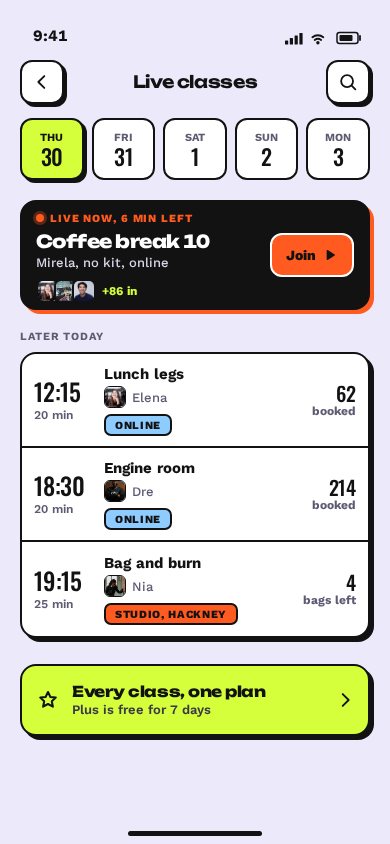
Tabata is a complete HIIT interval timer: welcome, a goal picker, sign in, a home with today's round strip and streak, a workout library with search, workout and exercise pages, a timer builder, a get ready count in, a live work phase and a rest phase, a finish screen and an effort log, history and a past session with heart rate, weekly stats, live coached classes with booking and a confirmation, a Plus plan, notifications, profile and settings. Lilac paper, black outlines, blaze orange work and acid lime rest.
| Detail | Value |
|---|---|
| Screen type | List |
| App | Tabata: HIIT interval timer |
| Category | Health and fitness |
| Design language | Neubrutalism, light |
| Type | Unbounded for headings, Work Sans for text |
| Colours | #ece9fb background, #ffffff surface, #121212 text, #5e5a72 text-muted, #ff5a1f accent, #121212 accent-contrast, #d4ff3a secondary, #121212 border, #e8253f danger |
What this screen says
- Live classes
- THU30
- FRI31
- SAT1
- SUN2
- MON3
- LIVE NOW, 6 MIN LEFT
- Coffee break 10
- Mirela, no kit, online
- +86 in
- Join
- Later today
- 12:1520 min
- Lunch legs
- Elena
- Online
- 62booked
- 18:3020 min
- Engine room
- Dre
- 214booked
- 19:1525 min
- Bag and burn
- Nia
- Studio, Hackney
- 4bags left
- Every class, one plan
- Plus is free for 7 days
Around it in Tabata
More list and feed screens
- Pillbox Medicines: Pharmacy refills and medicine reminders
- Rise Alarms: Alarm clock and sleep cycles
- Ward Visits: Patient portal for results, visits and messages
- Level Logbook: Glucose monitor companion
- Reformer Schedule: Pilates studio booking
- Sip History: Water intake and hydration
- Mend Plan: Physio and rehab exercises
- Jab History: Boxing workouts with a smart bag
- Exhale History: Breathwork sessions
- Bump Weeks: Pregnancy week by week
- Locker Timetable: Gym membership and class booking
- Morsel Saved meals: AI calorie tracker
What makes a good list screen
- Show what people need to decide. Each row should carry just enough to choose: a title, one or two details and a status. Everything else belongs on the detail screen.
- Keep rows consistent. The same information in the same place on every row lets people scan down a column instead of reading each item.
- Group with headings. Dates, categories or status headings break long lists into chunks people can skip through.
- Make common actions quick. Swipe actions, a checkbox or a heart on the row save opening the item for small tasks.
The full list screen guide and every example
Remix Tabata free: describe your own app and it is drawn in this design. Or get its files from $10: Figma, React Native, SwiftUI, Flutter and HTML.