Templates · Detail screens · Sports app · Swell
Swell Spot guide screen
A detail screen from Swell, a surf forecast app template in a Glass style. Screen 14 of 25.
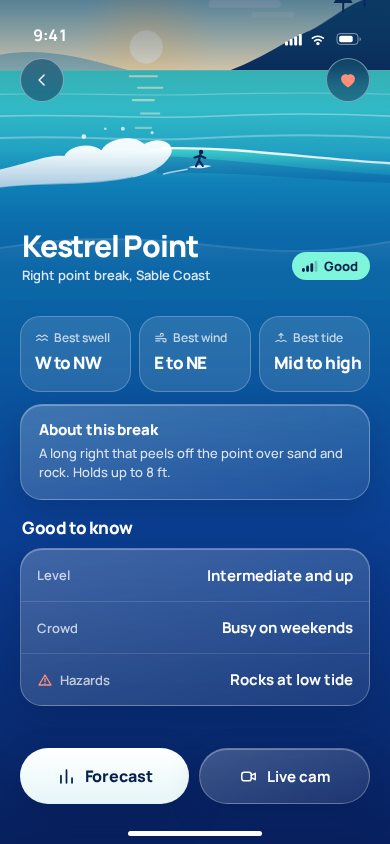
Swell is a complete surf forecast app: welcome, sign in and a home break picker, a spot home with today's rating, hourly surf bars, a week outlook, a tide curve, a wind compass, swell trains and a live cam, a spots map with a spot guide, a sessions log with season stats, swell alerts, notifications, a Plus plan, profile and settings. Everything sits on one teal to deep blue water gradient with frosted cards and foam white for whatever is selected.
| Detail | Value |
|---|---|
| Screen type | Detail |
| App | Swell: Surf forecast |
| Category | Sports |
| Design language | Glass, dark |
| Type | Manrope |
| Colours | #0b4a97 background, #3f79b6 surface, #ffffff text, #c3dcee text-muted, #ffffff accent, #06204d accent-contrast, #7ff5dc secondary, #6f9fd0 border, #ff8f7a danger |
What this screen says
- Kestrel Point
- Right point break, Sable Coast
- Good
- Best swell
- W to NW
- Best wind
- E to NE
- Best tide
- Mid to high
- About this break
- A long right that peels off the point over sand and rock. Holds up to 8 ft.
- Good to know
- Level
- Intermediate and up
- Crowd
- Busy on weekends
- Hazards
- Rocks at low tide
- Forecast
- Live cam
Around it in Swell
More detail screens
- Eddy River: River levels for paddlers
- Whistle Match: Grassroots league manager for coaches
- Oche League: Darts scorer and leagues
- Cairn Trail: Trails, contours and summits on one map sheet
- Lapse Session: Swim training
- Angler Catch: A fishing log drawn on the depth chart
- Piste Gondola: Ski resort companion
- Crag Gym: Climbing gym logbook
- Fairway Course: Golf course guide and scorecard
- Matchday Lineups: Football scores and fantasy
- Rally Club: Tennis and padel club
- Pitwall Tyres: Race engineering
Every sports app detail screen
What makes a good detail screen
- Lead with what identifies the item. A large image or title, the price or status, and the key facts at the top. People should know they are in the right place at a glance.
- Keep the main action visible. A sticky bottom button for Add to cart, Book or Play stays reachable while people scroll through details.
- Order information by importance. The facts that decide the choice come first; reviews, specifications and fine print further down.
- Use progressive disclosure. Long descriptions, specifications and policies can expand on tap rather than filling the screen.
The full detail screen guide and every example
Remix Swell free: describe your own app and it is drawn in this design. Or get its files from $10: Figma, React Native, SwiftUI, Flutter and HTML.