Templates · List and feed screens · Lifestyle app · Stub
Stub Alerts screen
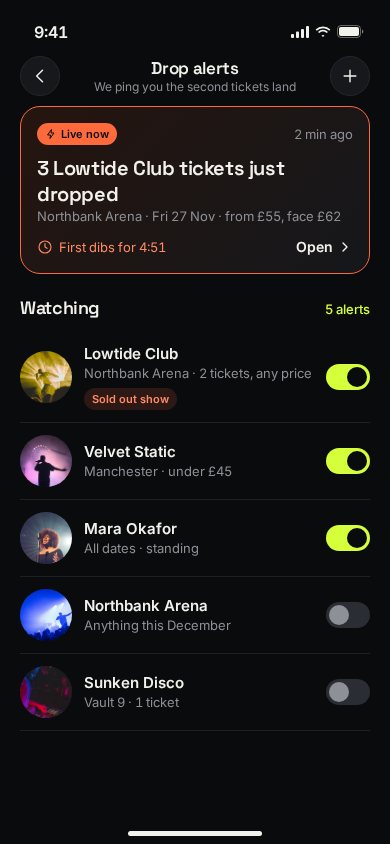
A list screen from Stub, a fan to fan ticket resale app template in a Dark-first style. Screen 20 of 25.
Stub is a complete fan to fan ticket resale app: welcome, sign in, a home with a live drop hero and selling fast events, search, an artist page with tour dates, an event page with a price coloured seat map, section picker, listings capped at face value, a listing with the seat view and a face value meter, checkout with a fan guarantee, a bought screen, a wallet of ticket stubs, a rotating barcode ticket, transfer to a friend, a sell flow with a suggested price and demand chart, listed, a selling dashboard, payouts, drop alerts, a live first dibs countdown, activity, a Plus plan, profile and settings. Near black and charcoal with acid lime and tangerine.
| Detail | Value |
|---|---|
| Screen type | List |
| App | Stub: Fan to fan ticket resale |
| Category | Lifestyle |
| Design language | Dark-first, dark |
| Type | Space Grotesk for headings, Inter for text |
| Colours | #0a0b0d background, #15171b surface, #f2f1ec text, #8d9097 text-muted, #d4ff3a accent, #0a0b0d accent-contrast, #ff6a3d secondary, #23262c border, #5a5e66 neutral |
What this screen says
- Drop alerts
- We ping you the second tickets land
- Live now 2 min ago
- 3 Lowtide Club tickets just dropped
- Northbank Arena · Fri 27 Nov · from £55, face £62
- First dibs for 4:51 Open
- Watching
- 5 alerts
- Lowtide Club
- Northbank Arena · 2 tickets, any price
- Sold out show
- Velvet Static
- Manchester · under £45
- Mara Okafor
- All dates · standing
- Northbank Arena
- Anything this December
- Sunken Disco
- Vault 9 · 1 ticket
Around it in Stub
More list and feed screens
- Sable New in: Fashion store
- Bazaar Chats: Local buy and sell
- Kiln Results: Handmade marketplace
- Drape Swap item: AI wardrobe and daily outfits
- Mane Saved looks: AI hairstyle try-on
- Annex Results: AI interior redesign
- Kino Episodes: Film and series streaming
- Waybill Archive: Every parcel, read like its label
- Torque Service: The workshop manual for your own car
- Vetly Pets: Pet health record
- Stitch Projects: A knitting companion drawn as one big knitting chart
- Roost Shopping list: Your shared house, stuck to the fridge door
Every lifestyle app list screen
What makes a good list screen
- Show what people need to decide. Each row should carry just enough to choose: a title, one or two details and a status. Everything else belongs on the detail screen.
- Keep rows consistent. The same information in the same place on every row lets people scan down a column instead of reading each item.
- Group with headings. Dates, categories or status headings break long lists into chunks people can skip through.
- Make common actions quick. Swipe actions, a checkbox or a heart on the row save opening the item for small tasks.
The full list screen guide and every example
Remix Stub free: describe your own app and it is drawn in this design. Or get its files from $10: Figma, React Native, SwiftUI, Flutter and HTML.