Templates · List and feed screens · Finance app · Strike
Strike Positions screen
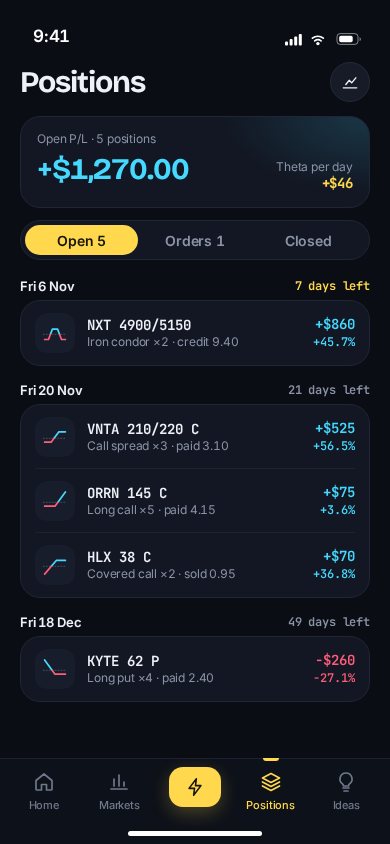
A list screen from Strike, an options trading app template in a Dark-first style. Screen 14 of 25.
Strike is a complete options trading app: welcome, choosing an options level, sign in, a home with account value and open positions, search, a stock page with IV rank and expected move, an option chain with a strike ladder, a contract with its Greeks, a strategy builder and payoff diagram, an order ticket with review and a fill, positions, a position with a roll, live P/L for an iron condor, strategy ideas, a video lesson, analytics, unusual flow, notifications, a Pro plan, profile and settings. Ink navy with strike yellow, cyan and coral.
| Detail | Value |
|---|---|
| Screen type | List |
| App | Strike: Options trading |
| Category | Finance |
| Design language | Dark-first, dark |
| Type | Bricolage Grotesque for headings, Inter for text |
| Colours | #0a0d14 background, #121723 surface, #eef1f7 text, #8b93a7 text-muted, #ffd84d accent, #17140a accent-contrast, #46d9ff secondary, #222a3a border, #ff5d7a danger |
What this screen says
- Positions
- Open P/L · 5 positions
- +$1,270.00Theta per day+$46
- Open 5 Orders 1 Closed
- Fri 6 Nov 7 days left
- NXT 4900/5150
- Iron condor ×2 · credit 9.40
- Fri 20 Nov 21 days left
- VNTA 210/220 C
- Call spread ×3 · paid 3.10
- ORRN 145 C
- Long call ×5 · paid 4.15
- HLX 38 C
- Covered call ×2 · sold 0.95
- Fri 18 Dec 49 days left
- KYTE 62 P
- Long put ×4 · paid 2.40
- −$260−27.1%
- Home
- Markets
- Ideas
Around it in Strike
More list and feed screens
- Lease Receipts: Your tenancy, drawn to plan
- Claim Expenses: Expenses, filed like a till receipt
- Tally Notifications: Monthly budgeting
- Divvy Notifications: Split bills with friends
- Ticker Movers: Stock investing
- Burrow Notifications: Shared savings pots
- Remit Notifications: International money transfer
- Piggy Chores: Pocket money for kids
- Settle Notifications: Bill payments and banking
- Fathom Notifications: Crypto wallet
- Marigold Notifications: Mobile banking
- Zentra Activity: Crypto trading
What makes a good list screen
- Show what people need to decide. Each row should carry just enough to choose: a title, one or two details and a status. Everything else belongs on the detail screen.
- Keep rows consistent. The same information in the same place on every row lets people scan down a column instead of reading each item.
- Group with headings. Dates, categories or status headings break long lists into chunks people can skip through.
- Make common actions quick. Swipe actions, a checkbox or a heart on the row save opening the item for small tasks.
The full list screen guide and every example
Remix Strike free: describe your own app and it is drawn in this design. Or get its files from $10: Figma, React Native, SwiftUI, Flutter and HTML.