Templates · Detail screens · Finance app · Storefront
Storefront Payout screen
A detail screen from Storefront, a finance app template in an Enterprise style. Screen 21 of 25.
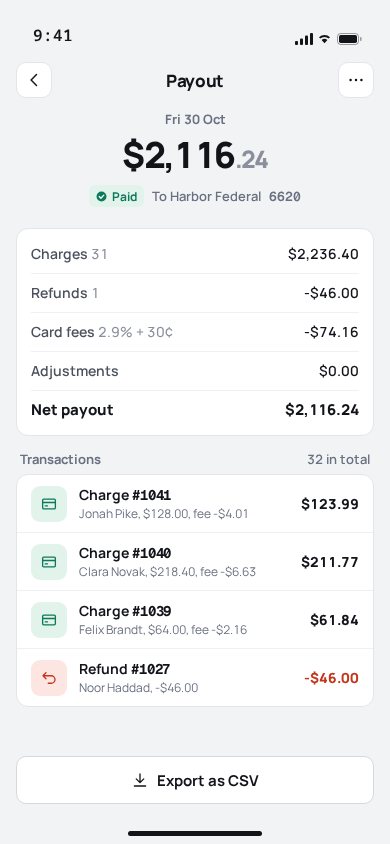
Storefront is a complete merchant app for a small online shop: welcome and sign in with a store picker, a home with today's sales against last week, live visitors and things to do, analytics, a live visitor map, orders with payment and fulfilment tags, an order with fulfil and buy label flows ending in a printable shipping label, search, products, a product page, add product, inventory, customers and a customer profile, discounts and a new code, payouts and a payout breakdown, notifications, plans, the store menu and settings. Cool grey and white with ink and persimmon.
| Detail | Value |
|---|---|
| Screen type | Detail |
| App | Storefront: Run your online store |
| Category | Finance |
| Design language | Enterprise, light |
| Type | Manrope |
| Colours | #f2f3f5 background, #ffffff surface, #12141a text, #697080 text-muted, #f2542d accent, #ffffff accent-contrast, #0b7a5a secondary, #e3e5ea border, #c2361c danger |
What this screen says
- Payout
- Fri 30 Oct
- Paid To Harbor Federal 6620
- Charges 31 $2,236.40
- Refunds 1 -$46.00
- Card fees 2.9% + 30¢ -$74.16
- Adjustments $0.00
- Net payout $2,116.24
- Transactions32 in total
- Charge #1041
- Jonah Pike, $128.00, fee -$4.01
- Charge #1040
- Clara Novak, $218.40, fee -$6.63
- Charge #1039
- Felix Brandt, $64.00, fee -$2.16
- Refund #1027
- Noor Haddad, -$46.00
- Export as CSV
Around it in Storefront
More detail screens
- Zap Wallet: Pay friends with a note
- Billfold Card: Cards, passes and tickets wallet
- Payly Chat: UPI payments, recharges and bills
- Crest Card: Credit card bills and rewards
- Bastion Checking: Everyday banking from a big bank
- Later Store: Buy now, pay in four
- Standing Card use: Credit score and reports
- Accrue Pot: Retirement and pension planner
- Levy Payment: Taxes for freelancers
- Bullion Gold: Gold and silver savings
- Wage Shift: Get paid as you work
- Keystone Loan: Mortgage and home loan tracker
Every finance app detail screen
What makes a good detail screen
- Lead with what identifies the item. A large image or title, the price or status, and the key facts at the top. People should know they are in the right place at a glance.
- Keep the main action visible. A sticky bottom button for Add to cart, Book or Play stays reachable while people scroll through details.
- Order information by importance. The facts that decide the choice come first; reviews, specifications and fine print further down.
- Use progressive disclosure. Long descriptions, specifications and policies can expand on tap rather than filling the screen.
The full detail screen guide and every example
Remix Storefront free: describe your own app and it is drawn in this design. Or get its files from $10: Figma, React Native, SwiftUI, Flutter and HTML.